
DnD XP Chart
Type your XP to see your level and the XP to the next one, or share an encounter's XP between the party.
Recent
Your last 10 settings, saved only in this browser. Nothing is uploaded.
How to use the XP chart
- Type your character’s total XP into the Your XP box.
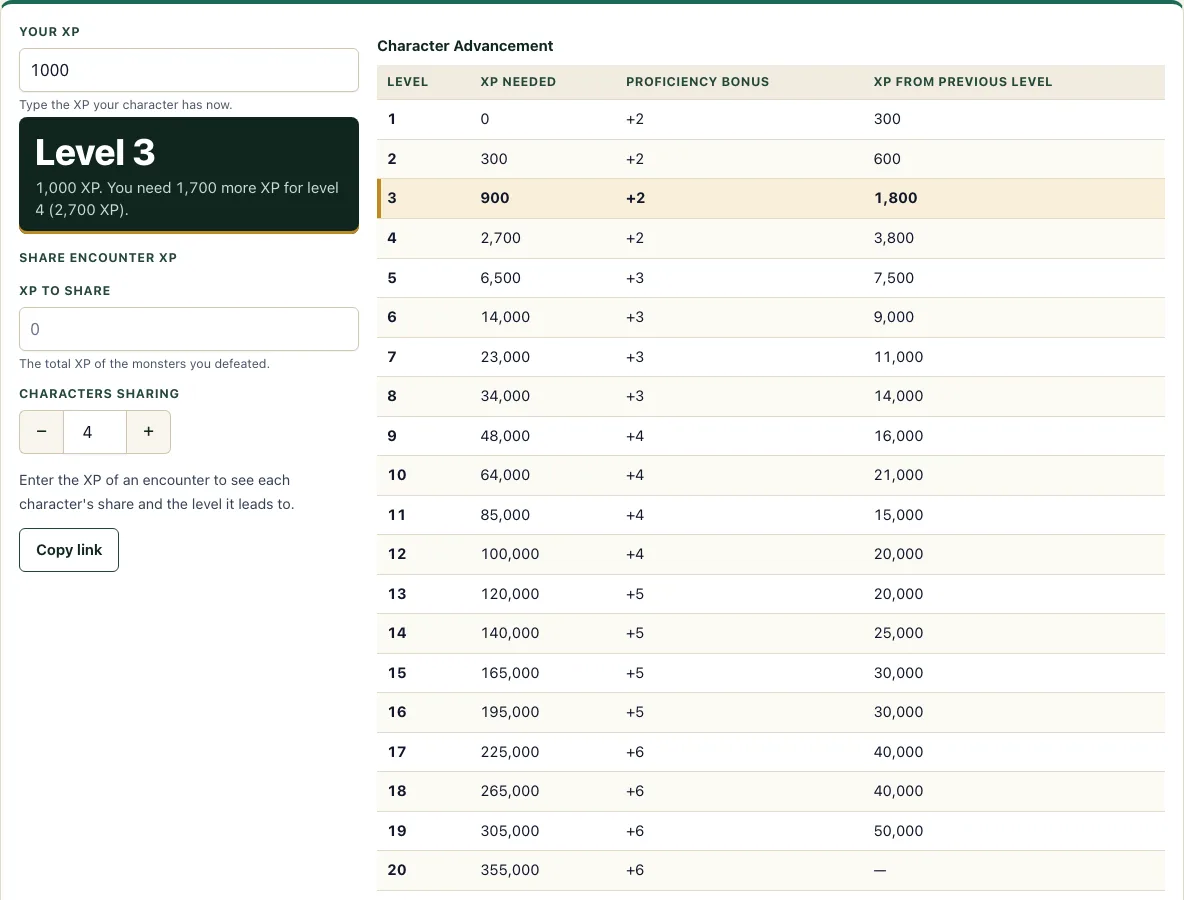
- Read the large answer. It shows the level that XP gives and how much more XP is needed for the next level.
- Look at the table. The row for your character’s current level is highlighted, so you can compare it with the rows above and below.
- To split an encounter, enter the total XP of the defeated monsters in XP to share.
- Set Characters sharing to the number of characters, from 1 to 12.
- Read N XP each. The tool rounds the share down and shows any leftover XP. It also says which level each character reaches once their share is added to their XP.
- The table shows XP, Proficiency Bonus and the gap from the previous level for all twenty levels.
- Change either box and the answer updates at once; there is no calculate button. Click Copy link to save your numbers in the address, so you can return to the same figures later or send them to someone else.
The page works on a phone. The buttons are large enough to tap easily, and the layout fits a 375 px screen. The tool does not calculate the XP value of monsters. For that, use the encounter calculator listed below.
How much XP do you need for each level in 5e?
A character reaches level 1 at 0 XP. Each higher level needs a fixed total: 300 XP for level 2, 900 for level 3, 2,700 for level 4, and so on up to 355,000 for level 20. XP needed for level 7: 23,000 XP. XP needed for level 5: 6,500 XP. XP needed for level 10: 64,000 XP. These numbers are totals, not increments. A character gains a level when their XP reaches the number in the table.
The gap between levels grows as the game goes on. Moving from level 1 to level 2 needs 300 XP, but moving from level 19 to level 20 needs 50,000 XP. For example, 1,000 XP is level 3, and the character needs 1,700 more XP to reach level 4 (2,700 in total). 300 XP is level 2, and the character needs 600 more to reach level 3 (900 in total).
How much XP to reach level 20?
A character needs 355,000 XP to reach level 20. This is the last row of the table. Level 19 starts at 305,000 XP, so a character at the start of level 19 needs 50,000 more XP to reach level 20.
Some tables use milestone levelling, where characters gain levels at story points and ignore XP. This chart is only useful for tables that track XP.
How do you split XP between players?
Add up the XP value of all the monsters the group defeated, then divide that total by the number of characters sharing it. Round the result down to a whole number. The leftover XP is whatever remains after the division.
For example, if the group defeats monsters worth 1,000 XP and three characters share it, each character receives 333 XP and 1 XP is left over. The tool does this sum for you in the Share encounter XP section, so you only need to enter the monster total and the number of characters.
What is the proficiency bonus at each level?
The proficiency bonus is +2 at levels 1 to 4, +3 at levels 5 to 8, +4 at levels 9 to 12, +5 at levels 13 to 16, and +6 at levels 17 to 20. It rises by 1 at levels 5, 9, 13, and 17. The chart lists the bonus in its own column, so you can see it in the same row as the XP needed for that level.
How this tool works and where the numbers come from
The level table (300 XP for level 2 up to 355,000 for level 20) and the proficiency bonus column are copied from the SRD 5.2.1 character advancement table. The sharing tool divides the XP total by the number of characters and rounds down, showing the remainder.
Sources
- Wizards of the Coast (2025). System Reference Document 5.2.1, Character Advancement table. Licensed CC-BY-4.0 (SRD v5.2.1 (published 2025-05-01); page last updated 2026-03-02) · checked
- Wizards of the Coast (2025). SRD 5.2.1, PDF edition (SRD 5.2.1) · checked
- Creative Commons (2013). Attribution 4.0 International (CC BY 4.0) licence of the SRD (4.0 International) · checked
Frequently asked questions
How do I track XP in D&D?
Write the total on paper, or type it into the experience points box of your 5e character sheet, and add the XP from each encounter as you finish it. When the total reaches the number for the next level in the chart, the character levels up. Groups that use milestone levelling skip this and level at story points.
Does this tool calculate XP for monsters?
No. Monster XP depends on each monster’s challenge rating (CR). Use the encounter calculator to work out the total XP for an encounter, then enter that total here to split it.
Is my XP total saved or uploaded anywhere?
No. The tool runs in your browser, and nothing is uploaded. You do not need an account. If you want to keep your numbers, click Copy link, which stores them in the page address.
Why does the share number round down?
Each character can only receive whole XP, so the tool rounds each share down. It shows the leftover separately, so the shares plus the leftover always add up to the total you entered.
Does the chart work on a phone?
Yes. The buttons are large touch targets, and the layout fits a 375 px screen, so you can use the chart at the table on a phone.
Can I use the chart if we use milestone levelling?
You can ignore the XP part, because milestone groups level up at story points. The chart still lists the Proficiency Bonus for each level, which you may want on the sheet.
What is the highest level in the chart?
Level 20, which needs 355,000 XP. If you type that number or more, the answer says it is the top level and shows no further XP to gain.
Related tools
- Encounter calculator: use it to work out the total XP of the monsters you plan to use before you share it between your party.
- Character sheet: use it to keep a character’s details, including level and proficiency bonus, in one place.
- HP calculator: use it when your character reaches a new level and you need to work out their hit points.
- Character creator: use it to build a new character from the start before you track their XP.
- Dice roller: use it to roll the dice for attacks, checks and damage during play.
- Encounter builder: Use it to pick SRD monsters for an encounter and see the XP they are worth.