
DnD Stat Roller
Pick a method and roll six ability scores with every die shown, then assign them and see the odds.
Recent
Your last 10 settings, saved only in this browser. Nothing is uploaded.
This DnD stat roller rolls the six ability scores for a 5e character, and it runs free in your browser with no sign-up. You pick a rolling method, roll a set, and see each score with its modifier, plus the odds for any score you want to hit.
The tool supports four methods: 4d6 drop lowest (the standard random method in the 5e SRD), 3d6 (the classic straight roll), 2d6 + 6 (scores from 8 to 18 with no weak scores), and 4d6 with 1s rerolled. For each method, it shows the average, the range, and the chance of reaching key scores. You can assign the six results to abilities by hand or let the tool place them for your class.
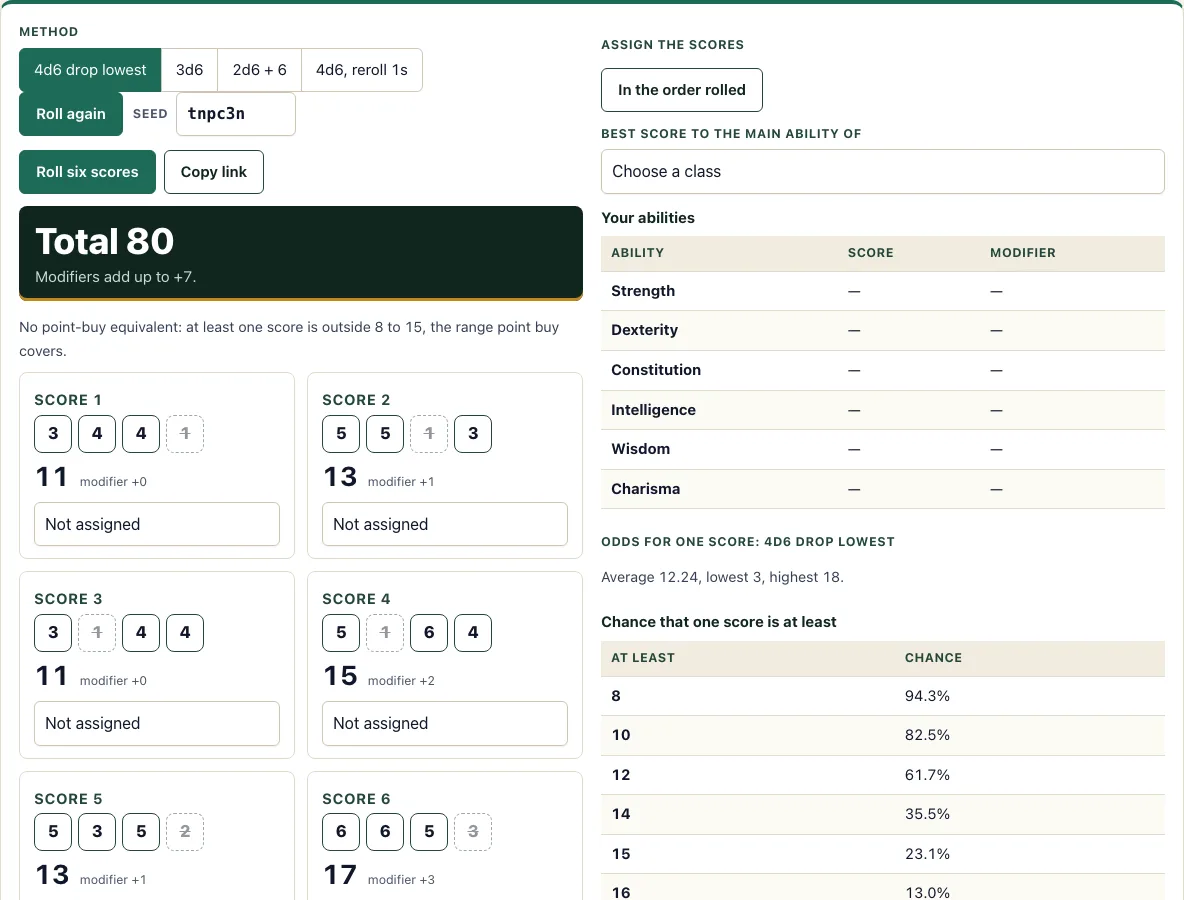
How to use the stat roller
- Under Method, choose 4d6 drop lowest, 3d6, 2d6 + 6, or 4d6, reroll 1s.
- Press the big Roll six scores button. Six score cards appear.
- Read each 4d6 card. The lowest die is struck through, and the total appears in large type with its modifier.
- Check the totals under the cards: the sum of all six scores and the sum of the six modifiers.
- Read the odds on the right: the average, the lowest and highest score, and the chance that one score is at least 8, 10, 12, 14, 15, 16, or 18.
- On each score card, use the Assign score N to menu to pick an ability. Choosing an ability that is already in use moves the score there.
- Or press In the order rolled to place the scores on Strength through Charisma, or pick your class in the Best score to the main ability of menu.
- Check the Your abilities table to confirm the final modifiers. Switching Method rolls a fresh set at once.
To save a set, press Copy link. The link stores your method and seed, so the same six scores come back when you open it. Your last 10 sets stay under Last sets in this browser only, and the Clear button removes them.
How do you roll stats in 5e?
In 5e, you create each of the six ability scores (Strength, Dexterity, Constitution, Intelligence, Wisdom, and Charisma) separately, and then assign them to the abilities you want. The SRD 5.2.1 random method (p. 21) is 4d6 drop lowest: roll four six-sided dice for each score, drop the lowest die, and add the other three.
Your modifier comes from the score. Subtract 10 from the score, divide by 2, and round down. A score of 10 or 11 gives +0, a score of 14 gives +2, and a score of 8 gives −1. Modifiers feed into attack rolls, skill checks, saving throws, and other parts of the game, so the score matters even when the number itself looks small. Whether you roll, use point buy, or use a standard array is usually decided by your table or game master.
What does 4d6 drop lowest mean?
4d6 drop lowest means you roll four six-sided dice and keep the three highest. The lowest die is removed, so the score is the total of the three remaining dice. The result ranges from 3 (1, 1, 1 kept) to 18.
Dropping the lowest die makes a real difference. Plain 3d6 averages 10.5, while 4d6 drop lowest averages 12.24. The stat roller computes the average exactly, and the odds table shows that a score of at least 15 happens 23.15% of the time with 4d6 drop lowest, compared with 9.26% with 3d6.
Why choose 2d6 + 6 or reroll 1s?
Both methods make weak characters rarer. With 2d6 + 6 every score is between 8 and 18 and the average is 13, so no score can fall below 8 and no ability is a disaster. Rerolling 1s raises the average of 4d6 drop lowest from 12.24 to 13.27 while still allowing 3 to 18. Chance still decides which ability gets the high scores, so assign them after you see the whole set. The plain methods are riskier but are the ones most tables use, so agree on one with your group first.
Frequently asked questions
What are the odds of rolling an 18?
With 4d6 drop lowest, an 18 needs three or four 6s among the four dice. That happens in 21 of the 1,296 possible rolls, which is 1.62%. The stat roller shows this chance in its odds table.
What is the average of 4d6 drop lowest?
The average score is 12.24. The average for 3d6 is 10.5, and for 2d6 + 6 it is 13. These are averages for one score, so across six scores the totals will vary.
Is rolling better than point buy?
Neither is better in every case. Rolling can give you one or two high scores, but it can also give you weak ones. Point buy gives you a known set of scores for a fixed cost. When all six rolled scores fall between 8 and 15, the tool adds up what they would cost in point buy (27 points in the SRD) and tells you how far above or below that budget they are.
Can I reroll my stats?
Yes. Press Roll six scores as many times as you like. Whether you may reroll at your table depends on your game master, so check before you use the new set in play. The tool keeps your last 10 sets in this browser under Last sets.
What is the 4d6, reroll 1s method?
It rerolls every 1 once, keeps the second roll even if it is a 1, and then drops the lowest die. It is a common house rule, not an SRD rule, so use it only if your group agrees. The tool’s average for this method is 13.27.
Is the stat roller free and private?
Yes. It is free to use, requires no account, and runs entirely in your browser. Nothing you roll is uploaded.
Can I use rolled ability scores commercially?
Yes. Scores you roll are yours, and you may use them or a list of them in a product you sell, such as a pregenerated character pack. See the terms.
Related tools
- Point buy calculator: use it to compare a point-buy build with the scores you rolled.
- Character creator: use it to build a full character after you have your ability scores.
- Character sheet: use it to record your scores, modifiers, and other details in one place.
- Dice roller: use it for any other dice you need during a session.
- HP calculator: use it to work out your hit points once your Constitution is set.
- Class quiz: use it if you are still deciding which class to play.
- XP chart: use it to check how much experience your character needs for each level.
- Character sheet PDF: use it when you want a printable sheet for your table.