
DnD Spell Slots
Choose your spellcasting classes and levels to see your spell slots, including multiclass and Pact Magic.
Recent
Your last 10 settings, saved only in this browser. Nothing is uploaded.
This free DnD spell slots calculator shows how many spell slots your character gets at each spell level, based on class and character level. It also works as a multiclass spell slots calculator, so you can combine two or more spellcasting classes into one result. It runs in your browser with no account or sign-up, and nothing you enter is uploaded.
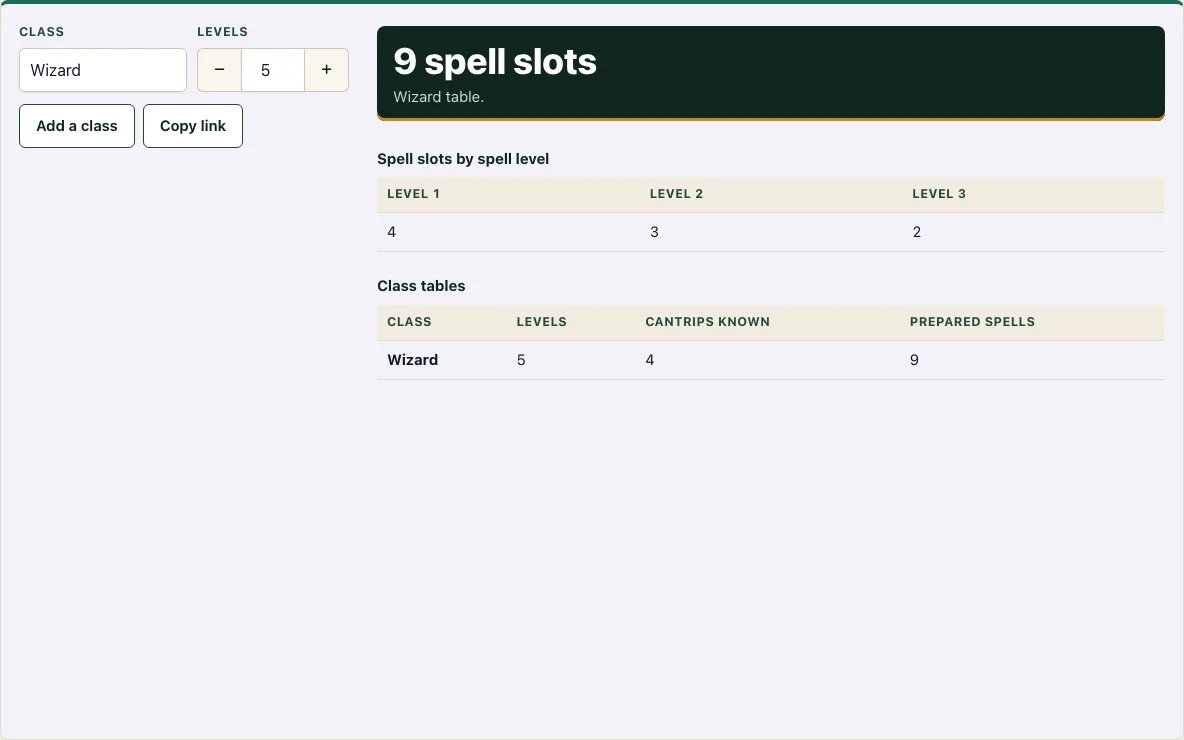
Pick a class, set its level, and the tool shows your total slots in large type, then breaks them down by spell level. A second table lists the cantrips known and prepared spells for each class at that level. If you want to check spell slots by level for a single class, use one row. If your character is multiclassed, add a row for each class and the tool works out the combined result for you.
How to use the Spell slots calculator
- In the first row, open the Class list and choose your class: Bard, Cleric, Druid, Paladin, Ranger, Sorcerer, Warlock, or Wizard.
- In the Levels box for that row, enter the class level from 1 to 20.
- If your character has a second spellcasting class, tap Add a class. A new row appears.
- Choose the class and enter its level in the new row. Repeat for any other classes.
- Keep the levels across all rows at 20 or lower. The tool warns you if the total goes over.
- Read the N spell slots number in large type at the top of the result.
- The result updates after every change, so there is no calculate button. Check the Spell slots by spell level table to see how many slots you have at each spell level.
- Check the Class tables to see the cantrips known and prepared spells for each class.
To remove a class you added by mistake, tap Remove on that row. Tap Copy link to save your settings in the page address, so you can open the same setup later. The buttons are large enough to tap on a phone, and the layout fits a 375 px screen.
How many spell slots do I get?
Your spell slots depend on your class and your level in that class. Each spell slot lets you cast one spell of a matching level, and higher spell levels have fewer slots. If you have only one spellcasting class, the tool uses that class’s own table from the SRD 5.2.1 and reads your slots from it.
How do multiclass spell slots work?
When a character has more than one spellcasting class, the slots come from a single shared pool. The tool adds up the full-caster levels (Bard, Cleric, Druid, Sorcerer, and Wizard) and half of your Paladin and Ranger levels, rounding up. It then reads the slots from the Multiclass Spellcaster table in the SRD, on page 25.
As an example, a Wizard 5 / Paladin 4 has a multiclass spellcaster level of 7 (5 plus half of 4, which is 2). That gives 4 first-level, 3 second-level, 3 third-level, and 1 fourth-level slot.
How do Warlock spell slots work?
Warlock Pact Magic is separate from the multiclass table. It is not added to the multiclass spellcaster level. Instead, a Warlock gets a small number of slots that are all the same spell level, and the level rises as the Warlock levels up. The tool shows these in their own box. Rests matter for more than slots: the 5e exhaustion rules also say how resting affects a tired character.
For example, a Sorcerer 3 / Warlock 2 gets 4 first-level and 2 second-level slots from the Sorcerer, plus 2 Pact Magic slots of level 1 from the Warlock.
What is the multiclass spellcaster level?
The multiclass spellcaster level is a single number the tool uses to look up your shared slots. It is found by adding your full-caster levels to half of your Paladin and Ranger levels, rounded up. A character with only one spellcasting class does not need this number, because the tool reads that class’s own table instead.
At spellcaster level 1, you get two 1st-level slots. At level 5, you get 4 first-level, 3 second-level, and 2 third-level slots. At level 9, you get 4/3/3/3/1 slots across the first five spell levels. At level 17, you get 4/3/3/3/2/1/1/1/1 slots across all nine.
How this tool works and where the numbers come from
A single-class character reads slots from that class’s table in the SRD 5.2.1. For a multiclass character the tool adds the levels of full spellcasting classes and half the Paladin and Ranger levels (rounded up), and reads the Multiclass Spellcaster table. Warlock Pact Magic slots are shown separately.
Sources
- Wizards of the Coast (2025). System Reference Document 5.2.1, Multiclassing and class spellcasting tables. Licensed CC-BY-4.0 (SRD v5.2.1 (published 2025-05-01); page last updated 2026-03-02) · checked
- Wizards of the Coast (2025). SRD 5.2.1, PDF edition (SRD 5.2.1) · checked
Frequently asked questions
Does the tool show which spells I can cast?
The tool shows how many cantrips known and prepared spells each class has at its level, not the names of the spells. To look up spell names by level, use the Spell list page.
Do my spell slots come back after a rest?
Yes. In the standard 5e rules, Warlock Pact Magic slots return after a short rest, and other spell slots return after a long rest. The tool shows how many slots you have, not how many you have used.
Why does a Paladin or Ranger get spell slots at level 1?
In the SRD 5.2.1 tables, Paladin and Ranger get spells from level 1. Their single-class table therefore starts with two 1st-level slots. In a multiclass build, they count as half a level toward the multiclass spellcaster level.
Can I use this on my phone?
Yes. The buttons are large touch targets, and the layout fits a 375 px screen.
Can I add the same class twice?
No. Each class can have only one row, and the Add a class button turns off when all eight spellcasting classes are in use. If you pick a class that is already in another row, that other row is removed, so put all of a class’s levels in one row.
Do Barbarian, Fighter, Monk and Rogue appear in the list?
No. The list holds only the eight classes that have spell slots or Pact Magic in the SRD 5.2.1 tables: Bard, Cleric, Druid, Paladin, Ranger, Sorcerer, Warlock and Wizard.
Related tools
- Character creator: Use it when you are building a new character from the start.
- Character sheet: Use it to record your slots and spells on a sheet you can keep track of during play.
- Spell list: Use it to look up the names of spells for each spell level.
- Class quiz: Use it when you are still deciding which class to play.
- HP calculator: Use it to work out your hit points for a given level.
- XP chart: Use it to see how much experience you need to reach each level.
- Point buy calculator: Use it to spend a set number of points on your ability scores.
- Stat roller: Use it to roll ability scores randomly instead of using point buy.