
DnD Shop Generator
Pick a shop type, a settlement size and a price change to get a priced stock list.
| Settlement | Share of matching SRD goods stocked | Magic item rarity for sale | Magic items |
|---|---|---|---|
| Village | 25–45% | None | 0 |
| Town | 45–70% | Up to Common | 0–2 |
| City | 70–95% | Up to Rare | 2–5 |
| Wondrous place | 80–100% | Up to Legendary | 3–7 |
Recent
Your last 10 settings, saved only in this browser. Nothing is uploaded.
The DnD shop generator is a free tool that creates a random stock list for a fantasy shop in fifth edition games. Choose a shop type and a settlement, and it lists the goods on sale with quantities and prices in gold pieces, plus magic items where the settlement allows them. It runs in your browser, with no account or sign-up needed.
Shops are built from the SRD 5.2.1 equipment and magic item lists, so the goods and prices follow the SRD text. The tool does not name shops, so give each one a name that suits your campaign. Use it to stock a village blacksmith, a city alchemist, or a magic shop in a wondrous place when your players walk in.
It is part of D20 Desk, a free 5e compatible tool site. It works on phones and tablets as well as computers.
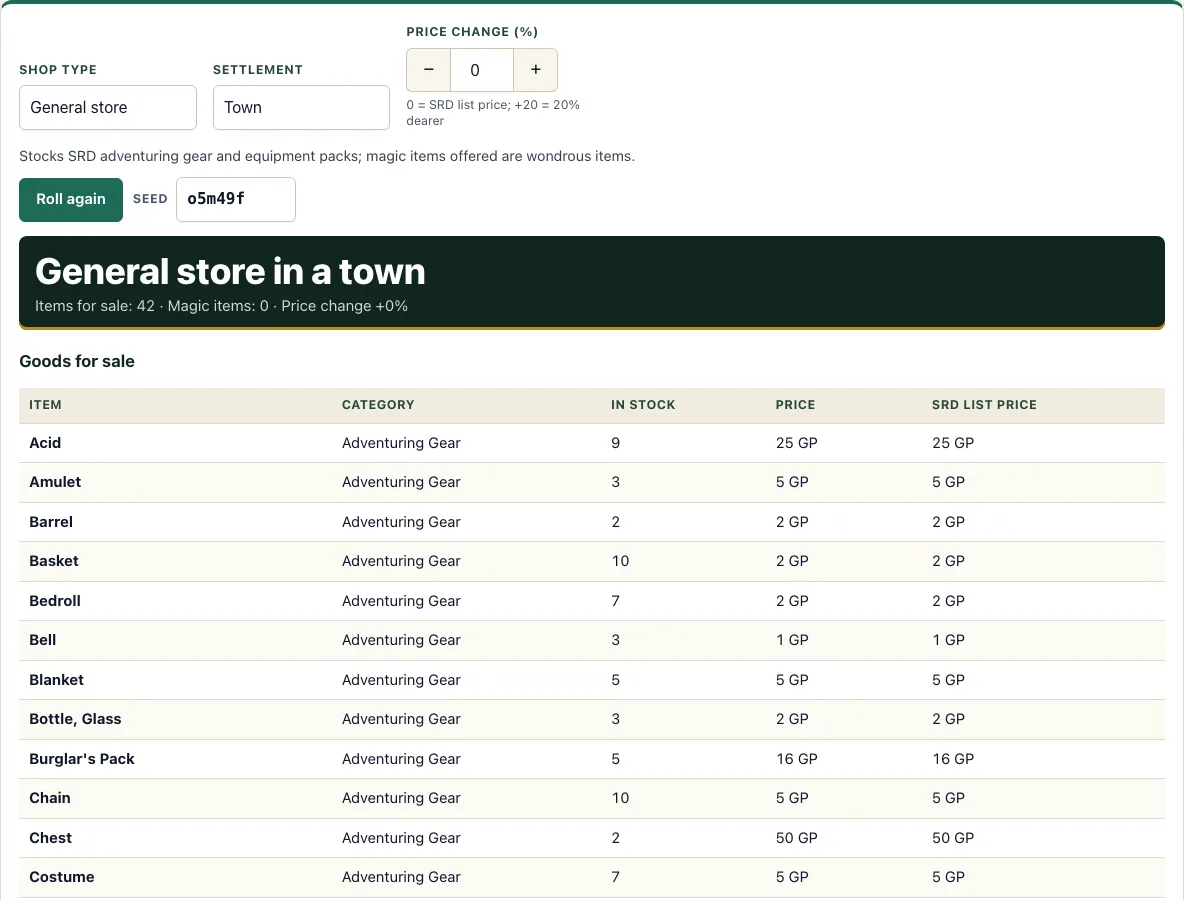
How to use the Shop generator
- Choose a Shop type: Blacksmith, General store, Alchemist, Tool and craft shop, Magic shop, or Fletcher and bowyer.
- Choose a Settlement: Village, Town, City, or Wondrous place. The settlement controls how many goods and how many magic items appear.
- Set the Price change (%) with the stepper. It runs from -50 to +200 in steps of 5. Leave it at 0 to see SRD list prices.
- Read the goods table. Each row shows the Item, its Category, the number In stock, the Price in gold pieces, and the SRD list price for comparison.
- Click a magic item’s name to read its full SRD text.
- Press Roll again for a new stock list with the same shop type, settlement, and price change.
- Type a value into the Seed box to fix the random results for that shop.
The page also has Copy text, Print, and Copy link buttons. Copy text and Print let you take the list into your game notes. Copy link shares a web address that includes the seed, so anyone who opens it sees the same stock you do.
Each time you press Roll again the stock changes but the shop type, settlement and price change stay as you set them. Changing any of those three settings also rolls a new list, and the link in your address bar always matches what is on screen.
How are shop prices set?
Each price starts from the SRD 5.2.1 equipment price for that item, given in gold pieces. The price change percentage then adjusts that figure: 0% keeps the list price, +50% makes it one and a half times as much, and -50% halves it. The SRD list price column shows the unmodified figure so you can compare the two.
Magic items follow their own rule. The SRD gives each rarity a value: Common 100 GP, Uncommon 400 GP, Rare 4,000 GP, Very Rare 40,000 GP, and Legendary 200,000 GP. Consumables other than spell scrolls cost half that value, and spell scrolls cost twice their scribing cost. The price change is then applied to the result, the same way it applies to mundane goods.
Stock depends on the settlement. A Village shows 25 to 45 percent of the matching SRD goods, a Town 45 to 70 percent, a City 70 to 95 percent, and a Wondrous place 80 to 100 percent. Cheap items appear in quantities of 1 to 12, while items costing 50 GP or more are limited to 1 or 2.
Which magic items can a shop sell?
Only magic items whose rarity fits the settlement. The SRD says Common items can often be bought in a town or city, Uncommon and Rare items are usually found only in cities, and rarer items only in wondrous places. The tool follows that guidance. A Town stocks Common items at most (0 to 2 items), a City stocks up to Rare (2 to 5 items), and a Wondrous place stocks up to Legendary (3 to 7 items). The Tool and craft shop never sells magic items, whatever the settlement.
For example, a Blacksmith in a City with the seed “example” stocks 42 goods and 3 magic items: Giant Slayer, Sword of Life Stealing, and Trident of Fish Command. Each magic item’s price follows the formula above, and you can click its name to read the full SRD entry.
Why does the settlement size change the stock?
A village market is small, and a city has dozens of traders, so the tool stocks a larger share of the matching SRD list as the settlement grows. The shares and the magic item counts are D20 Desk’s own settings, shown in the settlement table on the page; the rarity limits follow the SRD guidance above, and the rule that a village sells no magic items is ours. If you want a poor district, lower the price change; for a wealthy one, raise it. Once you know the size, you can place the town on a fantasy map generator map to see which regions it trades with.
Frequently asked questions
Can I raise or lower prices?
Yes. Use the Price change (%) stepper, which runs from -50 to +200 in steps of 5. The In stock and Price columns update, while the SRD list price column keeps the original figure for reference.
Does a village sell magic items?
No. In this tool, a Village stocks no magic items, following D20 Desk’s own rule. It still stocks mundane goods from the matching SRD lists.
Do shops have names?
No. The tool generates stock only, so you can name the shop yourself to fit your campaign.
Is the shop generator free to use?
Yes. It is free, requires no account or sign-up, and runs in your browser. Nothing you generate is uploaded.
Is this made by Wizards of the Coast?
No. D20 Desk is not affiliated with Wizards of the Coast. The tool is built on the SRD 5.2.1, which is licensed under CC-BY-4.0.
Can I print the stock list?
Yes. Print makes a paper copy of the goods and magic item tables, which is useful when your players shop between sessions.
Does the same seed give the same shop?
Yes, as long as the shop type, settlement and price change are the same. The seed is in the link, so Copy link shares the exact stock.
Can I use a generated shop commercially?
Yes. A shop and its stock list are yours to use commercially, for example in a paid town supplement. Item text from the SRD 5.2.1 needs the CC-BY-4.0 attribution when you publish it. See the terms.
Related tools
- Loot generator: Use it when you need treasure for a chest, a monster’s hoard, or a reward.
- Magic item generator: Use it when you want random magic items without a shop around them.
- NPC generator: Use it when you need a shopkeeper or a customer with a personality and a secret (names are yours to add).
- DM screen: Keep it open at the table for quick reference while your players browse.
- Random encounter generator: Use it when a journey between towns needs something unexpected to happen.
- Monster maker: Use it when your shop’s neighborhood needs a creature that is not in the standard lists.