
DnD Random Encounter Generator
Enter your party and a difficulty to roll an SRD monster group that fits the XP budget.
Recent
Your last 10 settings, saved only in this browser. Nothing is uploaded.
How to use the random encounter generator
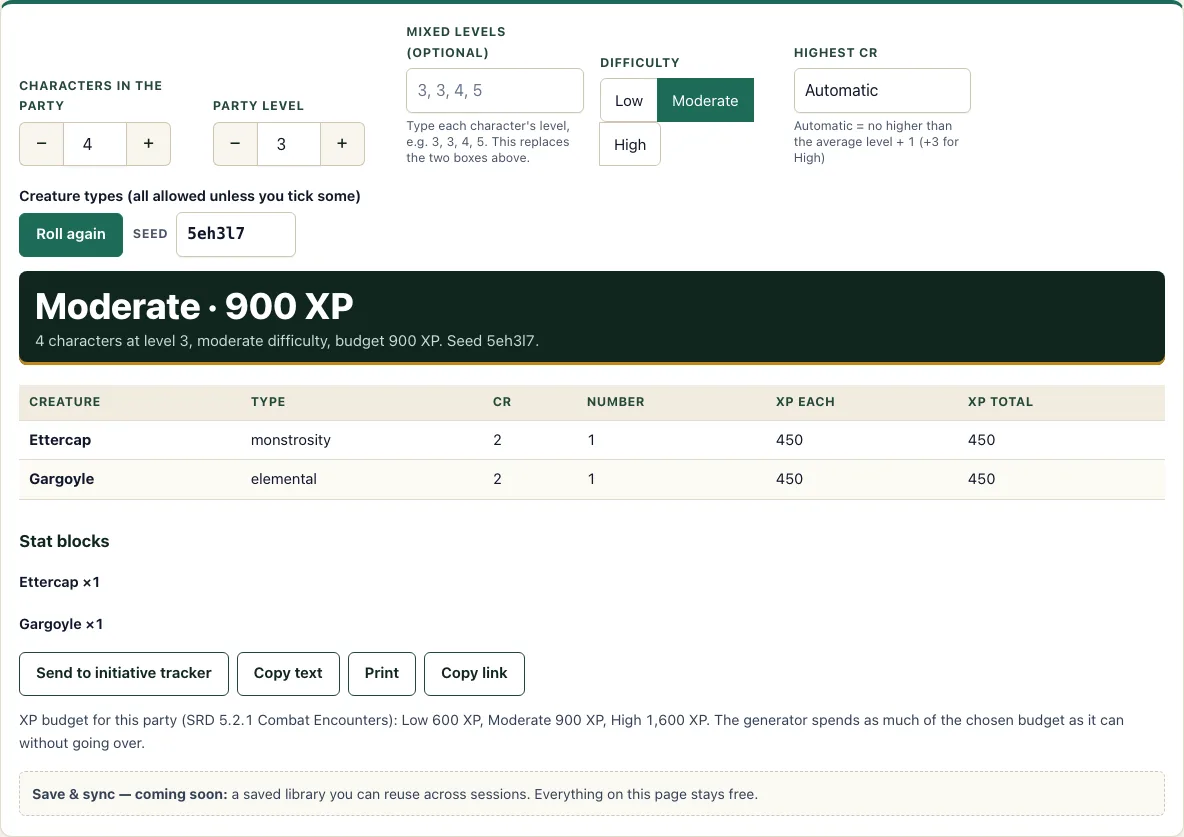
- Set Characters in the party with the stepper. The range is 1 to 10, and the default is 4.
- Set Party level with its stepper. The range is 1 to 20, and the default is 3. If your characters are different levels, type each level into the Mixed levels (optional) box, such as 3, 3, 4, 5. This box replaces the two steppers.
- Pick a Difficulty: Low, Moderate, or High. The default is Moderate.
- Open the Highest CR menu. Leave it on Automatic, or choose a specific CR.
- Optionally, open the Creature types list and tick the types you want to include.
- Read the result table. It shows Creature, Type, CR, Number, XP each, and XP total. Check the rating and any warnings shown with the result.
- Click Roll again for a new encounter. To reproduce a specific encounter, enter its seed in the Seed box.
Below the result, you can click Send to initiative tracker to open the initiative tracker with every creature already added. You can also use Copy text to copy the encounter, Print to print it, or Copy link to share it.
Changing any setting rolls a fresh encounter straight away, and the link in your address bar always matches what is on the screen. If a roll leaves the creature table empty, widen the creature types or raise the Highest CR.
How do I build an encounter for my party?
The generator picks a lead monster worth between 25% and 100% of the XP budget. It may then add more of that monster and one companion type, spending as much of the budget as it can without going over. It uses at most two stat-block types and at most twice as many creatures as there are characters, with a minimum of two creatures allowed. For travel encounters, draw the route first with the world map generator and roll once per stretch of the journey.
For example, with four level 3 characters on Moderate difficulty and seed mdwyig, the tool produces one Doppelganger (CR 3, 700 XP) and four Grimlocks (CR 1/4, 50 XP each). That totals 900 XP, which matches the Moderate budget, so the encounter is rated Moderate.
What is the XP budget in 5e?
The XP budget is the total experience points that a combat encounter should be worth for a party at a chosen difficulty. The Combat Encounters table in SRD 5.2.1 gives a budget for each difficulty at each party level. The budget depends on how many characters are in the party and how high their levels are.
For a party of four level 3 characters, the budget is 600 XP on Low, 900 XP on Moderate, and 1,600 XP on High. For a mixed-level party, each character’s level adds to the total. The tool compares the encounter’s total XP with the budget and shows a rating of Low, Moderate, High or Above High, using the same rules as the encounter calculator.
What do the ratings and warnings mean?
The rating is the lowest difficulty whose XP budget the encounter fits within. XP up to the Low budget is Low, above that up to the Moderate budget is Moderate, and above that up to the High budget is High. Above High means the XP is over the High budget; the SRD gives no category beyond High. Because the generator never goes over the budget you chose, the rating normally matches your chosen difficulty, unless a small roll happens to fit a lower budget.
The warnings are simple checks. One appears when there are more than twice as many creatures as characters, because that many stat blocks are hard to run at once. Another appears when a creature’s CR is higher than the party’s average level. A CR 0 creature is counted as 10 XP here.
Frequently asked questions
How do I run the encounter?
Click Send to initiative tracker to open the initiative tracker with all creatures added. Each entry includes the creature’s name, Dexterity modifier, hit points, and armor class. Creatures with more than one copy get numbered names, such as Grimlock 1 and Grimlock 2.
Can I use different levels in one party?
Yes. Type each character’s level into the Mixed levels (optional) box, separated by commas, such as 3, 3, 4, 5. When this box is used, it replaces the Characters and Party level steppers.
What does the Highest CR setting do?
It sets the highest challenge rating the generator can use. On Automatic, the highest CR is the party’s average level plus 1, with +3 added on High difficulty, and never below 1.
Why does my result show a warning?
The tool shows a warning when the encounter has many creatures or when a monster’s CR is higher than the party’s average level. These warnings help you check whether the fight is manageable before you run it.
Which monsters can it use?
The tool uses only monsters from the SRD 5.2.1, which includes 341 stat blocks. Each monster’s full stat block is available under Stat blocks. D20 Desk is not affiliated with Wizards of the Coast.
Can I use a generated encounter commercially?
Yes. An encounter you generate is yours to use commercially, for example in a paid adventure. Monster stat blocks from the SRD 5.2.1 need the CC-BY-4.0 attribution when you publish them. See the terms.
Related tools
- Encounter calculator: Check the difficulty of an encounter you have already chosen.
- Encounter builder: Assemble an encounter by hand, one monster at a time.
- Initiative tracker: Track turn order and hit points once the fight begins.
- XP chart: Look up XP values for challenge ratings and budgets.
- Loot generator: Create treasure to reward the party after the fight.
- Monster maker: Design a custom creature when no existing monster fits.
- Conditions: Look up the rules for conditions that monsters or spells apply.
- Dungeon generator: Create a dungeon layout to place your encounter in.