
DnD Quest Generator
Choose your party's level and how many quests you want, and roll.
Recent
Your last 10 settings, saved only in this browser. Nothing is uploaded.
How to use the Quest generator
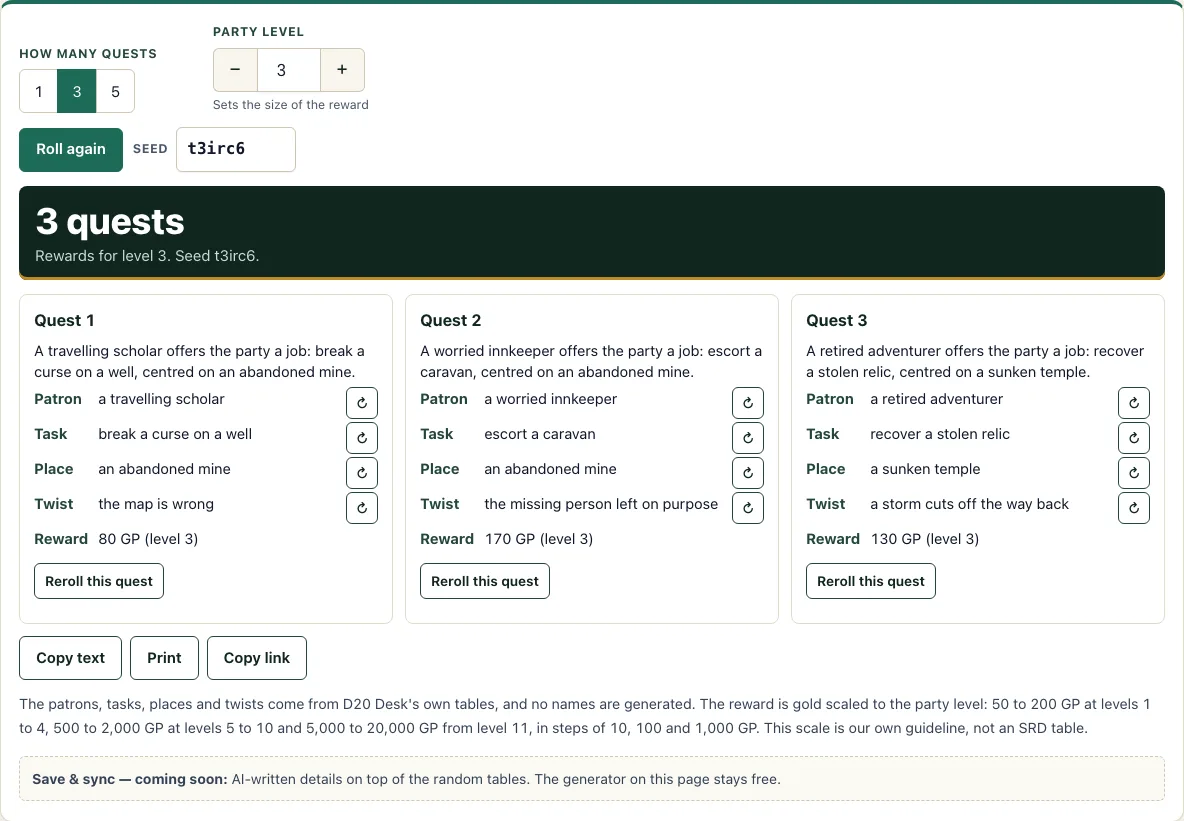
- Pick how many quests you want with the “How many quests” switch. You can choose 1, 3 or 5. It starts on 3.
- Set the “Party level” stepper from 1 to 20. It starts on 3. The level only changes the gold reward.
- Read each quest card. The one-sentence summary sits at the top, followed by Patron, Task, Place, Twist and Reward.
- If one part does not suit your table, press its reroll button on Patron, Task, Place or Twist. Only that part changes.
- To replace the whole card, press “Reroll this quest”.
- Press “Roll again” for a fresh set. To return to a set you liked, type its value into the “Seed” box.
Copy text copies the quests as plain text, Print prints them, and Copy link gives you a URL. The seed and any rerolled parts are stored in that link, so you or a friend can open the same quests again.
Rerolling a single part never changes the others, so you can keep a patron you like and keep rerolling the Task or Twist until they fit. The page opens with three quests already rolled at party level 3, and everything you change is stored in the link. Use Copy text when you want the quests in your own notes, and Print when you want them on paper at the table.
How do I come up with a quest quickly?
The tool builds each quest from five parts, and each part is picked from its own list. Every quest card has a Patron, a Task, a Place, a Twist and a Reward, and the summary sentence joins the first three into one line in this format: “[Patron] offers the party a job: [task], centred on [place].”
The lists are D20 Desk’s own. There are 12 patrons, 12 tasks, 12 places and 12 twists. One twist is “nothing - it is exactly what it seems”, so not every quest has a hidden catch. That matters at the table, because a quest with no twist is often the right choice for a short session.
Work from the summary first. If the patron is wrong for your setting, reroll only the patron and keep the task and place. This is quicker than rerolling the whole card, and it keeps the parts that already fit. Once you have a quest you like, copy the link so the seed is saved.
How much gold should a quest pay?
The reward is a guideline scaled to party level. It is D20 Desk’s own guideline, not a table from the SRD, so treat it as a starting point rather than a rule. The reward goes up in three bands: levels 1 to 4, levels 5 to 10, and level 11 and up.
The tool picks the amount for you. Levels 1 to 4 pay 50 to 200 GP in steps of 10, levels 5 to 10 pay 500 to 2,000 GP in steps of 100, and level 11 and up pay 5,000 to 20,000 GP in steps of 1,000. Raise or lower the figure by hand if the job is unusually easy or dangerous.
Because the party level changes only the reward, you can keep a seed and check the same patron, task, place and twist at a different level. This is useful if your party is about to level up and you want the next quest ready.
How do I turn a quest into a session?
Start with the twist, because it decides what the players learn and when. Then decide what the patron really wants, what stands between the party and the place, and what the reward changes in the story. Three scenes are usually enough: the offer, the place and the consequence. If the quest crosses the world, sketch the route on a map from the fantasy map generator.
If you want the quest tied to a particular town, roll the town first with the city generator and use its rumours and trouble as extra hooks. Use the campaign planner to write the quest into a session with its scenes, NPCs and treasure.
Frequently asked questions
Does it make names?
Not on this page. The tables cover patrons, tasks, places and twists. Use the DnD name generator for the people and the town name generator for the places.
How much gold should a quest pay?
The reward follows the party level, using three bands from D20 Desk’s own guideline: 50 to 200 GP at levels 1 to 4, 500 to 2,000 GP at levels 5 to 10, and 5,000 to 20,000 GP from level 11. Adjust the amount to suit your game.
Can I use it on my phone?
Yes. The tool works on phones and tablets, so you can roll a quest at the table without a laptop.
Is this made by Wizards of the Coast?
No. D20 Desk is a free 5e compatible tool site built on the SRD 5.2.1 (CC-BY-4.0). It is not affiliated with Wizards of the Coast.
Does the tool save or send my quests anywhere?
Everything runs in your browser and nothing is uploaded. The only saved details are the ones you choose to share through Copy link.
Can I make a quest for a level 15 party?
Yes. Set the party level to 15 and the reward uses the band for level 11 and up. The patron, task, place and twist stay the same for the seed you are using.
Can I use generated quest hooks commercially?
Yes. Quest hooks you generate are yours to use commercially, for example in a paid adventure or a hook table in a supplement. See the terms.
Related tools
- Dungeon generator: use it when your quest leads the party to a place that needs rooms and layout.
- Random encounter generator: use it when you need a surprise fight on the road to the quest location.
- Loot generator: use it when you want to decide what the party finds after completing the task.
- NPC generator: use it when your patron or another character needs a personality and a secret (names are yours to add).
- Shop generator: use it when the quest sends the party to a town and they need somewhere to buy supplies.
- Magic item generator: use it when the reward should include a magic item rather than only gold.
- City generator: use it to build the town the quest starts in.
- Campaign planner: use it to write the quest into a session with its scenes and NPCs.