
DnD Point Buy Calculator
Spend 27 points on six ability scores and see each cost, background increase, final score and modifier.
Recent
Your last 10 settings, saved only in this browser. Nothing is uploaded.
This free DnD point buy calculator for 5e helps you spend 27 points across the six ability scores of a new character. As you adjust each score, it shows the cost, the background bonus, the final score and the modifier. It runs in your browser, and you don’t need an account or sign-up to use it.
Point buy is one way to set starting ability scores in 5e. Instead of rolling dice, you start every ability at 8 and buy increases until your points run out. The tool keeps a running total, so you can see how many points are left at a glance. You can also add a background increase, which raises your scores without using any points. If you want a quick starting layout, the standard array button fills in a set of values in one click.
How to use the Point Buy Calculator
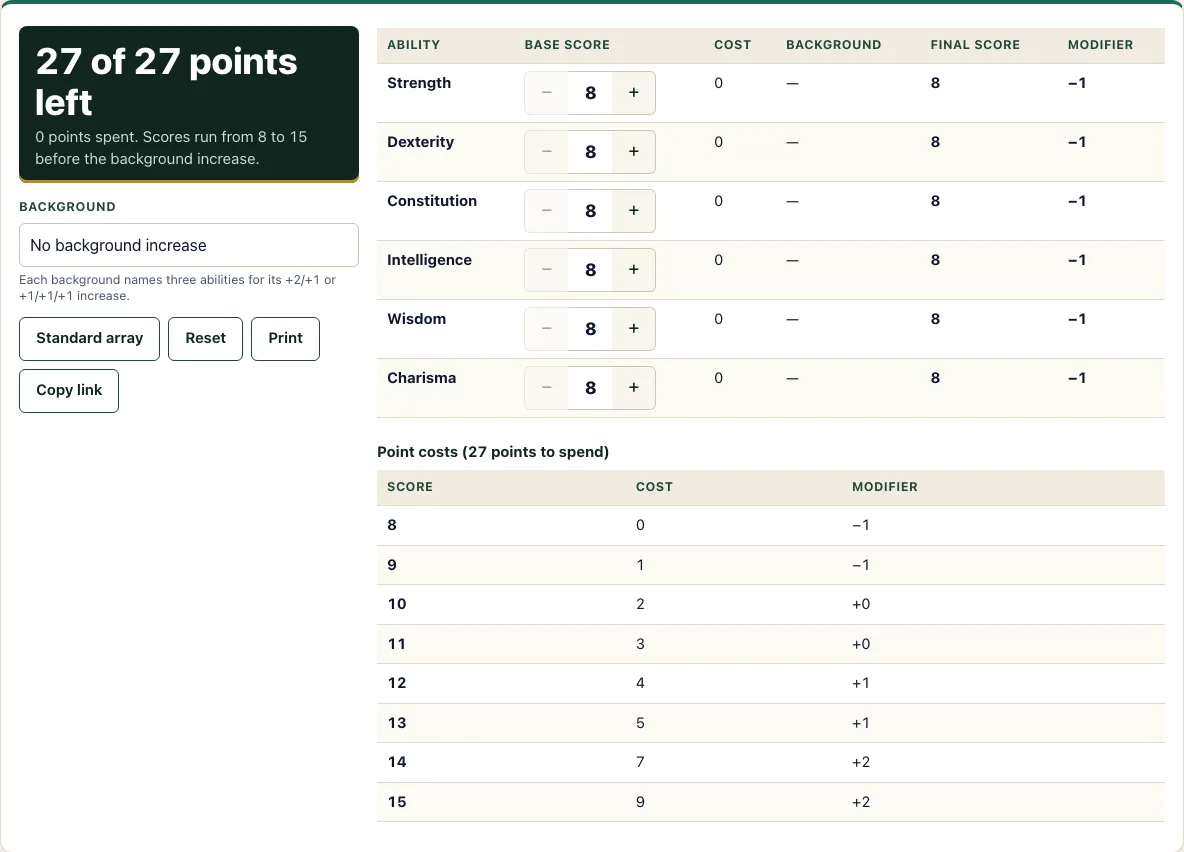
- Check the big result at the top. It reads “N of 27 points left,” with the points you have spent shown underneath.
- Find the row for the ability you want to change, from Strength to Charisma.
- Press the plus button to raise that base score, or the minus button to lower it. Each row shows what its current score costs. The plus button is disabled when the next point would take you over 27, or when the score is already 15.
- Open the Background field and choose Acolyte, Criminal, Sage or Soldier. Choose “No background increase” if you don’t want one.
- Pick a background increase option. With “+2 and +1,” choose one listed ability in the “Gets +2” field and a different listed ability in the “Gets +1” field. With “+1 to all three,” each of the three listed abilities gets +1.
- Read the Background, Final score and Modifier columns. The final score is your base score plus any background increase, and the modifier is worked out from that final score.
The Standard array button sets the six abilities to 15, 14, 13, 12, 10 and 8. Reset sets every score back to 8. Print prints the ability table. Copy link stores your six base scores, your background and your increase choice in the address, so you can share your build or return to it later. The buttons are large enough to tap, and the layout fits a 375 px phone screen.
How does point buy work in 5e?
Point buy lets you build your six ability scores within a fixed budget. You have 27 points to spend. Every ability starts at 8, and a base score can go as high as 15 before any background increase is added. Each point you spend raises one score, and the tool stops you from going over budget.
Your choice is about how to split the 27 points. The standard array, 15, 14, 13, 12, 10 and 8, costs exactly 27 points: 9 + 7 + 5 + 4 + 2 + 0. Three 15s and three 8s also cost exactly 27: 9 + 9 + 9. Six 12s cost 24 points, which leaves 3 unspent. Six 13s would cost 30, which is over budget, so you could not reach that layout.
The cost curve makes middle scores cheap and top scores dear: the six steps from 8 to 14 cost 7 points in total, while the one step from 14 to 15 costs 2 more. Because the budget is fixed, most builds pick one or two high scores and accept a low one, such as an 8 in a dump ability. Other spreads show the trade-offs. Scores of 15, 15, 13, 10, 8 and 8 cost 25 points and leave 2. Scores of 14, 14, 13, 12, 10 and 8 also cost 25. Raising a 14 to a 15 costs 2 points but does not change the modifier, because both give +2. The extra point is only worth it when a background +1 lifts that 15 to 16, which gives +3.
What does each score cost in point buy?
Each score has a fixed cost. From 8 up to 13, every step costs 1 point more than the last: 9 costs 1, 10 costs 2, 11 costs 3, 12 costs 4 and 13 costs 5. The steps from 13 to 14 and from 14 to 15 each cost 2 points, so 14 costs 7 and 15 costs 9. This jump is why high scores get expensive quickly.
The modifier comes from the final score, not the base score. Subtract 10 from the score, divide by 2, and round down. A final score of 8 or 9 gives -1, 10 or 11 gives +0, 12 or 13 gives +1, 14 or 15 gives +2, and 16 or 17 gives +3. With point buy, the highest possible final score is 17, because a base 15 plus a +2 background increase makes 17.
How this tool works and where the numbers come from
You have 27 points; every score starts at 8 and can be raised to 15 using the SRD point-cost table (13 costs 5 points, 14 costs 7, 15 costs 9). The modifier is (score - 10) divided by 2, rounded down. The background bonus is added after the points are spent.
Sources
- Wizards of the Coast (2025). System Reference Document 5.2.1, Ability Score Point Costs table. Licensed CC-BY-4.0 (SRD v5.2.1 (published 2025-05-01); page last updated 2026-03-02) · checked
- Wizards of the Coast (2025). SRD 5.2.1, PDF edition (SRD 5.2.1) · checked
Frequently asked questions
Point buy 5e vs standard array: which should I use?
Both give the same total value: the standard array 15, 14, 13, 12, 10, 8 costs exactly 27 points. Point buy lets you choose a different spread, such as three 15s and three 8s, while the array is a fixed set of six numbers. If you would rather roll, use the ability score roller.
How many points do you get in point buy?
In 5e point buy, you get 27 points. You spend them to raise your six base scores from 8. Any points you don’t spend are left over.
Does the background increase count against the points?
No. The background increase is added on top of your base scores and does not use any points. It appears in the Background column, and the Final score and Modifier columns include it.
What is the standard array?
The standard array is a fixed set of six values: 15, 14, 13, 12, 10 and 8. It costs exactly 27 points, so it uses your whole budget. The Standard array button fills these values in, and you can change them from there.
Is point buy better than rolling?
Neither method is better in every case. Point buy gives every character the same budget and a predictable result, while rolling dice is random and can produce higher or lower scores. Agree with your group on which method to use before you start.
Can I save or share my point buy scores?
Yes. Copy link stores your six base scores, your background and your increase choice in the address. Anyone who opens that link will see the same build.
Related tools
- Character creator: Use it when you want to take your ability scores and build out the rest of a character.
- Stat roller: Use it if your group rolls dice for ability scores instead of using point buy.
- Character sheet: Use it to record your scores and track your character during play.
- Class quiz: Use it when you are still deciding which class to play.
- HP calculator: Use it to work out your character’s hit points.
- XP chart: Use it to check how much experience your character needs for each level.
- Character sheet PDF: Use it when you want a printable character sheet to fill in by hand.
- Dice roller: Use it for any dice rolls your game needs.