
DnD NPC Generator
Choose how many NPCs you want, optionally keep a species or occupation, and roll.
Recent
Your last 10 settings, saved only in this browser. Nothing is uploaded.
The DnD NPC generator creates random non-player characters for fifth edition games in a few clicks. Each NPC gets a species, an occupation, an age and build, a personality, a voice, an ideal, a bond, a flaw, a goal, a secret, an alignment and the languages they speak, so you can place a believable character in a scene without writing one from scratch.
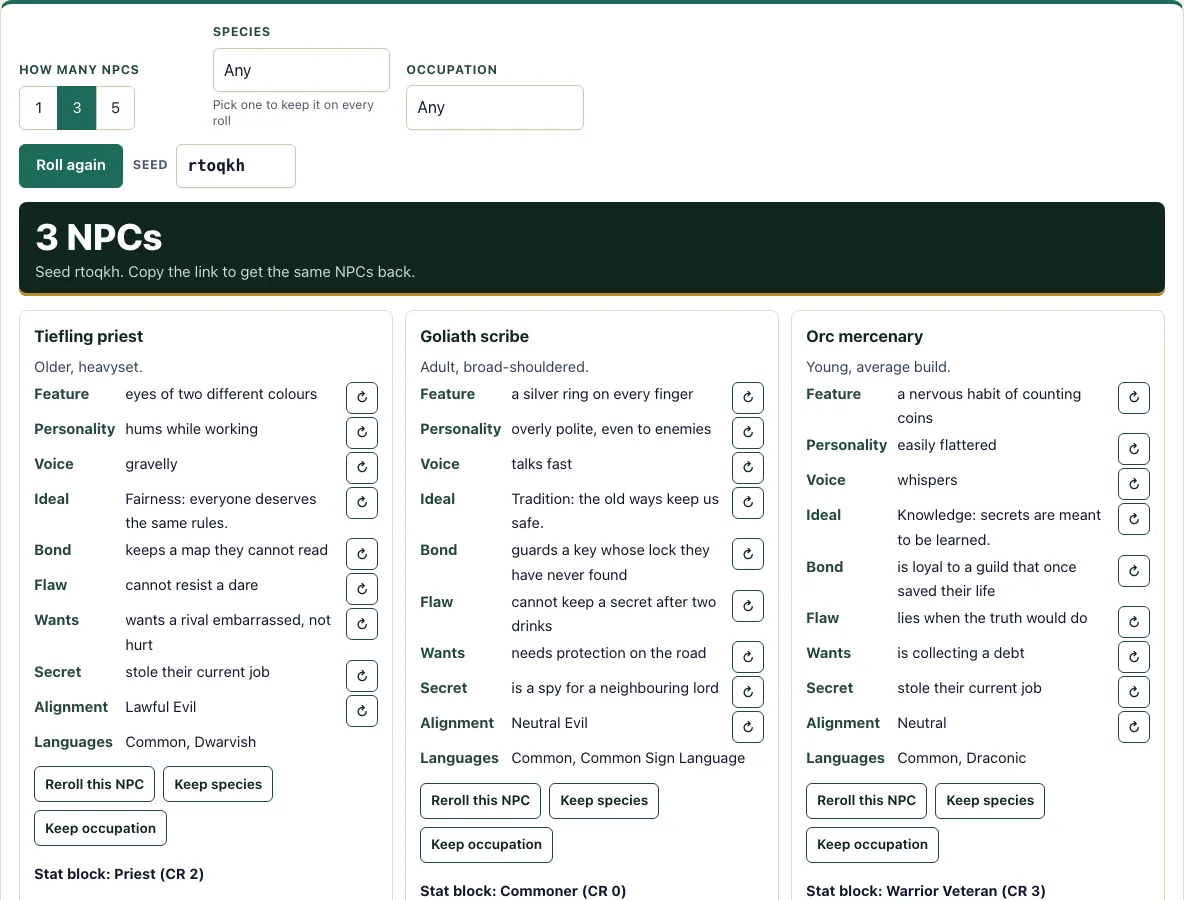
Choose how many NPCs you want, filter by species or occupation, and reroll any line you do not like. Each occupation also links to a stat block from the SRD, so you have rules for combat if the NPC needs them.
The tool is free, needs no account or sign-up, and runs entirely in your browser. Nothing you generate is uploaded. It also works on phones and tablets.
How to use the DnD NPC generator
- Set the ‘How many NPCs’ switch to 1, 3 or 5. The default is 3.
- Open the ‘Species’ menu and choose Any or one of the nine SRD species: Dragonborn, Dwarf, Elf, Gnome, Goliath, Halfling, Human, Orc or Tiefling.
- Open the ‘Occupation’ menu and choose Any or one of the 24 occupations.
- Press ‘Roll again’ to generate your NPCs.
- Read each card. The heading shows the species and occupation, followed by age, build and the traits.
- Open the collapsible ‘Stat block’ section on a card to see the SRD stat block linked to that occupation.
- Press the small button next to any line to reroll only that line, or press ‘Reroll this NPC’ to replace the whole card.
- Write a name for each NPC yourself.
Use the Seed box to set the starting point for a set of NPCs. The seed is stored in the page address, so ‘Copy link’ gives you a link that reproduces the same NPCs, including any rerolled lines. ‘Copy text’ copies all the NPCs as plain text, and ‘Print’ prints the cards with the stat blocks already open. If you choose 5 NPCs instead of 3, the first 3 stay the same, because each NPC is generated independently of the count.
How do I make an NPC quickly in 5e?
Set the count, species and occupation, then press ‘Roll again’. Each card arrives with a species, occupation, age, build, personality, voice and motivation already filled in, so you do not need to build anything by hand. To decide where the NPC lives, you can draw a world map generator map and put their home in one of its regions. When the NPC needs a counter on the battle map, make a token maker token for them.
Most of the work in running an NPC is roleplay: how they talk, what they want and what they hide. The card covers that. For combat or skill checks, the linked stat block gives you the numbers. Many everyday NPCs, such as innkeepers and farmers, use the Commoner stat block, which is the simplest one to run.
Does the generator give names?
Not on this page, which makes the rest of the NPC. Use the DnD name generator to name each one by species, with a nickname and a one-line hook if you want them, or write your own so it fits your campaign’s setting and language.
A good approach is to read the card first, then choose a name that suits the NPC’s occupation, species and voice. A blacksmith with a gruff voice might suit a short, plain name, while a travelling mage might suit something more formal.
What stat block does an NPC use?
The generator links each occupation to a stat block from the SRD 5.2.1, shown in the collapsible ‘Stat block’ section of the card. The examples are:
- Innkeeper, blacksmith and farmer: Commoner (CR 0)
- Town guard: Guard (CR 1/8)
- Priest: Priest (CR 2)
- Travelling mage: Mage (CR 6)
- Knight: Knight (CR 3)
- Bandit leader: Bandit Captain (CR 2)
Challenge Rating (CR) is a guide to how dangerous a creature is, so a CR 0 Commoner is much weaker than a CR 6 Mage. Pick the stat block that matches how much trouble you expect the NPC to cause.
Can I keep the species or occupation and reroll the rest?
Yes. Press ‘Keep species’ or ‘Keep occupation’ on a card to lock that choice for every NPC on the page. Then press ‘Roll again’ or ‘Reroll this NPC’ to change the other details. You can also reroll single lines with their small buttons.
The Languages line has no reroll button, so it stays as generated. If you want to change the languages, use ‘Roll again’ or ‘Reroll this NPC’ on the card.
Frequently asked questions
Can I get the same NPCs again later?
Yes. The seed is stored in the page address, and ‘Copy link’ reproduces the same NPCs, including any lines you rerolled. Save the link if you want to return to a set.
Is the DnD NPC generator free?
Yes. It is free, requires no account or sign-up, and runs in your browser. Nothing you generate is uploaded.
Does it work on a phone or tablet?
Yes, the generator works on phones and tablets as well as desktop computers.
Where do the rules and stat blocks come from?
The species and stat blocks come from the SRD 5.2.1, which is licensed under CC-BY-4.0. The occupations, looks, personality, ideal, bond, flaw, wants, secret and voice come from D20 Desk’s own original tables. D20 Desk is not affiliated with Wizards of the Coast.
Will the generator write backstories with AI?
A line on the page says that AI-written details are coming later. The generator itself will stay free.
Do the first NPCs change if I choose 5 instead of 3?
No. Each NPC is generated independently of the count, so the first 3 NPCs stay the same when you choose 5.
Can I print the NPCs?
Yes. Print makes cards with the stat blocks already open.
Can I use generated NPCs commercially?
Yes. NPCs you generate are yours, and you may use them commercially, for example in a paid adventure or a printable cast list. See the terms.
Related tools
- Shop generator: Use it to stock a shop that your NPCs run or visit.
- Random encounter generator: Use it when you need a surprise encounter on the road or in a dungeon.
- Languages: Use it to look up the languages your NPCs might speak.
- Monster maker: Use it when you need a creature that is not covered by an NPC’s stat block.
- DM screen: Use it to keep useful rules and tables within reach during play.
- Loot generator: Use it to decide what treasure an NPC or encounter carries.
- Magic item generator: Use it when an NPC has a magic item to give, sell or hide.
- Initiative tracker: Use it to keep turn order straight when an NPC joins a fight.