
DnD Monster Maker
Edit the numbers of a creature and get a finished stat block you can print or download.
Recent
Your last 10 settings, saved only in this browser. Nothing is uploaded.
The DnD monster maker is a free 5e tool that builds a complete stat block for a custom creature in your browser. You fill in the fields, pick a Challenge Rating, add attacks and traits, and the preview on the right updates as you type. No account is needed, and it works on a phone as well as a computer.
You can start from a blank creature or from any of the 341 SRD 5.2.1 stat blocks, then change anything you need. The tool works out your Proficiency Bonus, experience value, hit points, saving throws and skill bonuses from the numbers you enter, so you can focus on the monster’s design. When you finish, download the stat block as an image, print it, or export a file to keep.
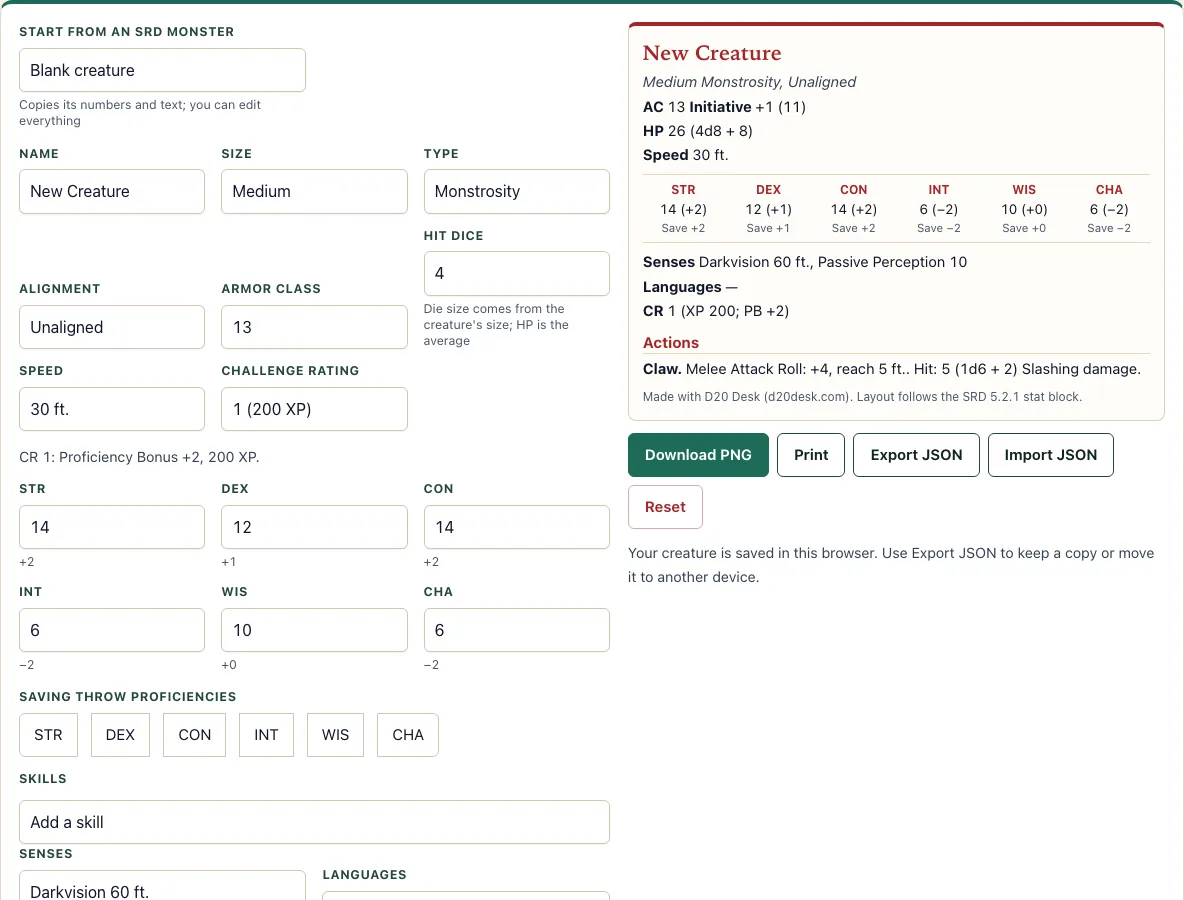
How to use the Monster Maker
- Choose a starting point. Select Start from an SRD monster to load one of the 341 SRD 5.2.1 stat blocks, or Blank creature for an empty template.
- Fill in the basics: Name, Size (Tiny to Gargantuan), Type, Alignment, Armor Class, Hit Dice and Speed.
- Set the Challenge Rating (0 to 30). The line under the fields shows the Proficiency Bonus and XP for that CR.
- Enter the six ability scores. Each one shows its modifier.
- Tick the saving throw proficiencies you want, then add skills. Tick Expertise where it applies.
- Fill in Senses, Languages, Vulnerabilities, Resistances and Immunities.
- Add Actions, Traits, Bonus Actions, Reactions and Legendary Actions. For an attack, choose the ability, melee or ranged, reach or range, damage dice and damage type. Use the arrow buttons to reorder entries and remove any you don’t need.
- Check the preview on the right as you go. Hit points, saving throws, skill bonuses, Initiative, Passive Perception and attack bonuses are worked out for you from the scores and the Challenge Rating.
Your creature is saved automatically in this browser. Use Download PNG for an image, Print for a paper copy, or Export JSON to keep a file you can open on another device. Import JSON loads a file made by this tool, and Reset starts the editor again.
How do I make a custom monster in 5e?
A 5e stat block follows a fixed order: name and type, Armor Class, hit points, speed, ability scores, saves, skills, senses, languages, Challenge Rating, then traits and actions. Fill them in that order, because some values depend on others. Size comes first, since it sets the hit die. Then decide the monster’s role in combat, and write its attacks to match.
How do I pick a monster’s CR?
Challenge Rating (CR) measures how difficult a creature is, and this tool uses the CR you choose; it does not calculate one. CR sets two numbers: the Proficiency Bonus and the XP. CR 1 gives +2 and 200 XP, CR 5 gives +3 and 1,800 XP, CR 9 gives +4, CR 13 gives +5, and the bonus reaches +9 at CR 29–30. To judge your choice, open an SRD monster with a similar CR and compare its hit points, attack bonuses and damage.
How is monster HP calculated?
Hit points come from the number of Hit Dice, the die for the creature’s size, and its Constitution modifier. Each Hit Die adds the average of its die plus the Constitution modifier. The dice are d4 for Tiny, d6 Small, d8 Medium, d10 Large, d12 Huge and d20 Gargantuan. The Owlbear is Large with Constitution 17 (modifier +3) and 7 Hit Dice. Its average per die is 5.5 + 3 = 8.5, so 7 × 8.5 = 59.5, shown as 59 (7d10 + 21), rounded down as in the SRD.
How are saves, skills and attacks worked out?
A saving throw is the ability modifier, plus the Proficiency Bonus if you ticked that ability. A skill bonus is the modifier of its ability plus the Proficiency Bonus, or twice the bonus with Expertise. An attack bonus is the modifier of the attack’s ability plus the Proficiency Bonus, and the average damage is the dice average plus that modifier, rounded down. Passive Perception is 10 plus the Perception bonus, or 10 plus the Wisdom modifier if Perception is not added as a skill.
Can I export or print my monster?
Yes. Download PNG is best when you want a picture of the stat block to share or drop into a document. Export JSON saves the editable data, so you can reopen and change the creature later with Import JSON. Print sends the stat block to your printer.
Can I start from an existing SRD monster?
Yes. Start from an SRD monster loads any of the 341 SRD 5.2.1 stat blocks as a template, and every field stays editable. This is useful for reskinning a known creature by changing its name, swapping its attacks, or raising or lowering its CR. Changing the CR updates the Proficiency Bonus and XP shown under the fields.
Frequently asked questions
Is the Monster Maker free to use?
Yes. It is free, needs no account, and works in your browser on a phone or a computer.
Does the tool check whether my monster is balanced?
No. The Challenge Rating is the number you pick, and the tool does not test game balance. Compare your creature with SRD monsters of a similar CR to judge it.
Can I use the stat block in my own notes or handouts?
Yes. Download PNG gives a picture you can paste into a document, and Print gives a clean paper copy. What you make is yours to use, and the SRD text it contains is shown with the SRD 5.2.1 CC-BY-4.0 notice on the site.
Can I reskin an SRD monster?
Yes. Load it with Start from an SRD monster, change the name, swap the attacks or edit the numbers, and the preview updates. Text entries such as traits keep the SRD wording until you edit them.
Where is my monster saved?
Your creature is saved automatically in your browser. A saved monster library is planned for later, so for now, export a JSON file for each monster you want to keep.
Do the attack lines match the SRD format?
Yes. The tool writes each attack in SRD format, for example “Melee Attack Roll: +7, reach 5 ft. Hit: 14 (2d8 + 5) Slashing damage.” The attack bonus is the ability modifier plus the Proficiency Bonus.
Can I use a stat block made here commercially?
Yes. The stat block you make is yours to use commercially, for example in a paid adventure. If it contains SRD 5.2.1 text, CC-BY-4.0 asks you to include the SRD attribution when you publish it. See the terms.
Related tools
- Encounter calculator: Check how hard a set of monsters will be for your party.
- Encounter builder: Put monsters together into a balanced fight.
- Damage calculator: Work out damage totals for attacks and spells.
- Initiative tracker: Track turn order during combat.
- HP calculator: Work out a character’s hit points by class, level and Constitution.
- Conditions: Look up what each condition does in play.
- Token maker: Make a token image for your monster.