
DnD Magic Item Generator
Filter by rarity, category and attunement, choose how many items, and roll.
Recent
Your last 10 settings, saved only in this browser. Nothing is uploaded.
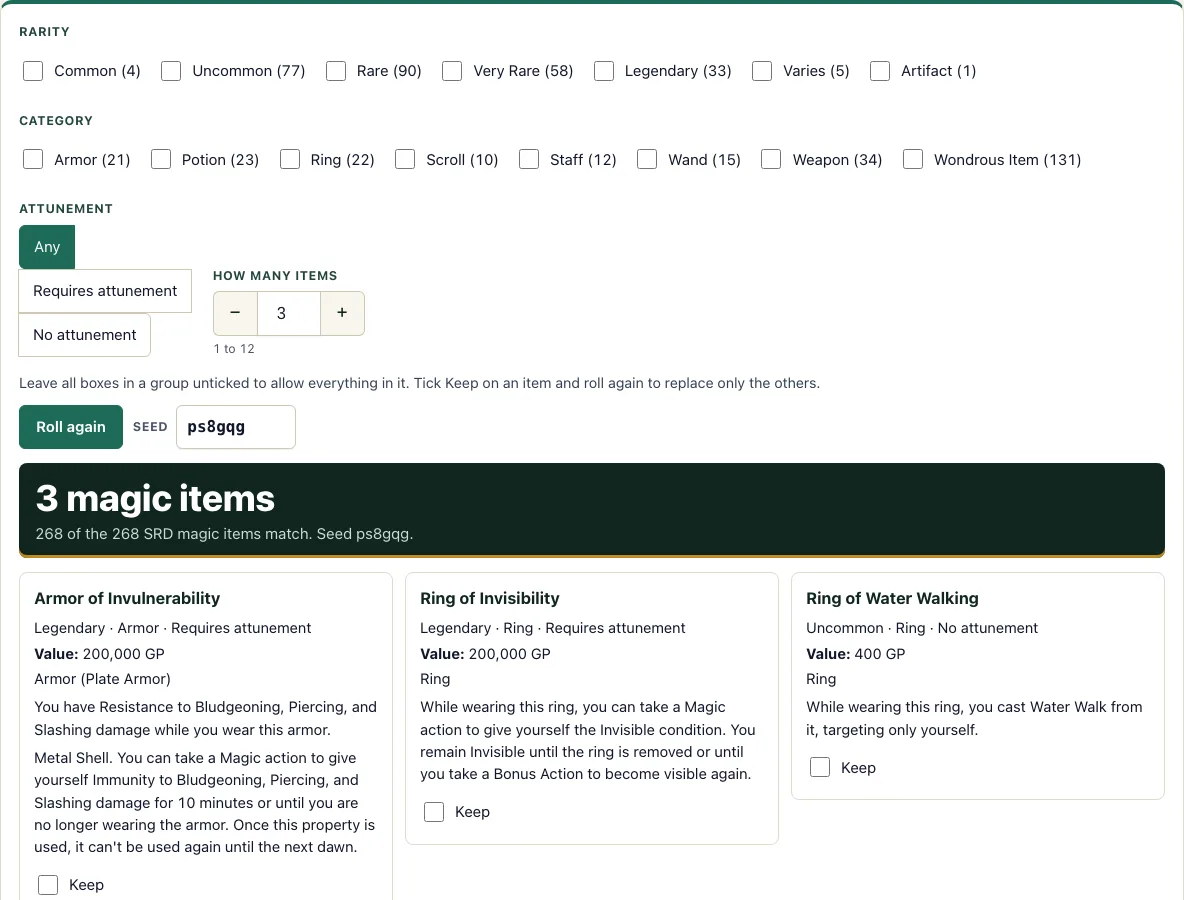
How to use the Magic Item Generator
- Under Rarity, tick the rarities you want. Each box shows how many items it contains. Leave a group unticked to allow everything in it.
- Under Category, tick the categories you want, using the same rule.
- Set the Attunement switch to Any, Requires attunement or No attunement.
- Use the How many items stepper to choose a number from 1 to 12. The default is 3.
- If you want a specific roll, type a value in the Seed box.
- Select Roll again to generate the items.
- Check the answer bar, which shows how many of the 268 items match your filters.
- Read each card. It shows the name, rarity, category, whether it requires attunement, the value and the full SRD text.
- To keep an item, tick its Keep box, then select Roll again. Only the other items are replaced. Changing any filter clears the kept items.
Copy text copies the full text of every item on the page. Print prints the cards. Copy link creates a link that stores your filters, kept items and seed, so you can return to the same set or share it.
Magic items are most useful when they fit a story, so treat a roll as a prompt. Read the full text on the card, decide who is carrying the item and why, and use Keep on the items you want while you reroll the rest until the set suits your table.
What does attunement mean?
Attunement is the process by which a creature forms a bond with a magic item. Attuning to an item takes a Short Rest spent focusing on it. A creature can be attuned to no more than three magic items at once, which limits how many powerful items one character can use. Some items also list extra requirements in their text, such as needing a particular class or spellcasting ability.
That limit is why the Attunement switch matters. In this data, 135 of the 268 items require attunement. Choose Requires attunement to see only those, or No attunement to see items that can be used without a bond. Each card that requires attunement is marked, and its full text explains any extra conditions.
How much is a magic item worth?
The value on each card follows the SRD 5.2.1 value for its rarity. Common items are worth 100 GP, Uncommon 400 GP, Rare 4,000 GP, Very Rare 40,000 GP and Legendary 200,000 GP.
Two groups are handled differently. Consumables other than spell scrolls are worth half the rarity value, so a Potion of Healing shows 50 GP. Spell scrolls are worth twice their scribing cost. The Artifact and any item with a varying rarity show “varies” instead of a fixed number, because the SRD does not give one price for them. Check the full text on the card before you decide how much an item should cost in your game.
A roll is a prompt, not a ruling. Read the full text on the card, decide who carries the item and why, and keep the ones that fit your story. Items in the same category often do similar jobs, so filtering by category is a quick way to find a reward that suits a class. Rarity is the quickest way to match a reward to the party’s level: Common and Uncommon items suit early adventures, while Very Rare and Legendary items are for the top of a campaign.
Frequently asked questions
Which magic items are in the SRD?
Only items from the SRD 5.2.1 appear here. The data holds 268 items: 4 Common, 77 Uncommon, 90 Rare, 58 Very Rare, 33 Legendary, 1 Artifact and 5 whose rarity varies. They fall into 8 categories, with Wondrous Item the largest at 131 entries.
Can I keep an item and reroll the rest?
Yes. Tick the Keep box on any card, then select Roll again. The kept items stay on the page, and the other items are replaced. If you change a filter, the kept items are cleared, so keep only what you still want after adjusting your settings.
Why does an item show “varies” for its value?
Five items have a rarity that varies, and the Artifact has no rarity value in the SRD table. The tool cannot give one price for these, so the value reads “varies.” Read the item’s full text for guidance on its worth.
Do I need an account to use the generator?
No. The tool is free, requires no account and no sign-up, and runs in your browser. Nothing you generate is uploaded.
Are items from other sourcebooks included?
No. Only SRD items appear in the data. If you want an item from another book, you will need to add it to your game yourself.
What if the answer bar shows a very low number?
The answer bar shows how many of the 268 items match your filters. A low number means your choices are narrow. Tick more rarities or categories, or set the Attunement switch to Any, to widen the results.
Can I print the items?
Yes. Print prints the cards with the full SRD text, which is handy for handing an item to a player.
Can I use generated magic items commercially?
Yes. The items you roll are yours to use commercially. Their descriptions come from the SRD 5.2.1, so CC-BY-4.0 asks you to include the SRD attribution when you publish them. See the terms.
Related tools
- Loot generator: Use it when you need a full treasure haul, not just magic items.
- Shop generator: Use it to stock a merchant’s shelves for a town or market scene.
- Random encounter generator: Use it to pick a surprise encounter for the road or dungeon.
- NPC generator: Use it to create a quick character for a shopkeeper, quest giver or rival.
- DM screen: Use it to keep common rules and tables close at hand during play.
- Damage calculator: Use it to check how much damage an item or attack could deal.