
5e HP Calculator
Choose your classes and levels and your Constitution score to get your hit point maximum and a level-by-level table.
Recent
Your last 10 settings, saved only in this browser. Nothing is uploaded.
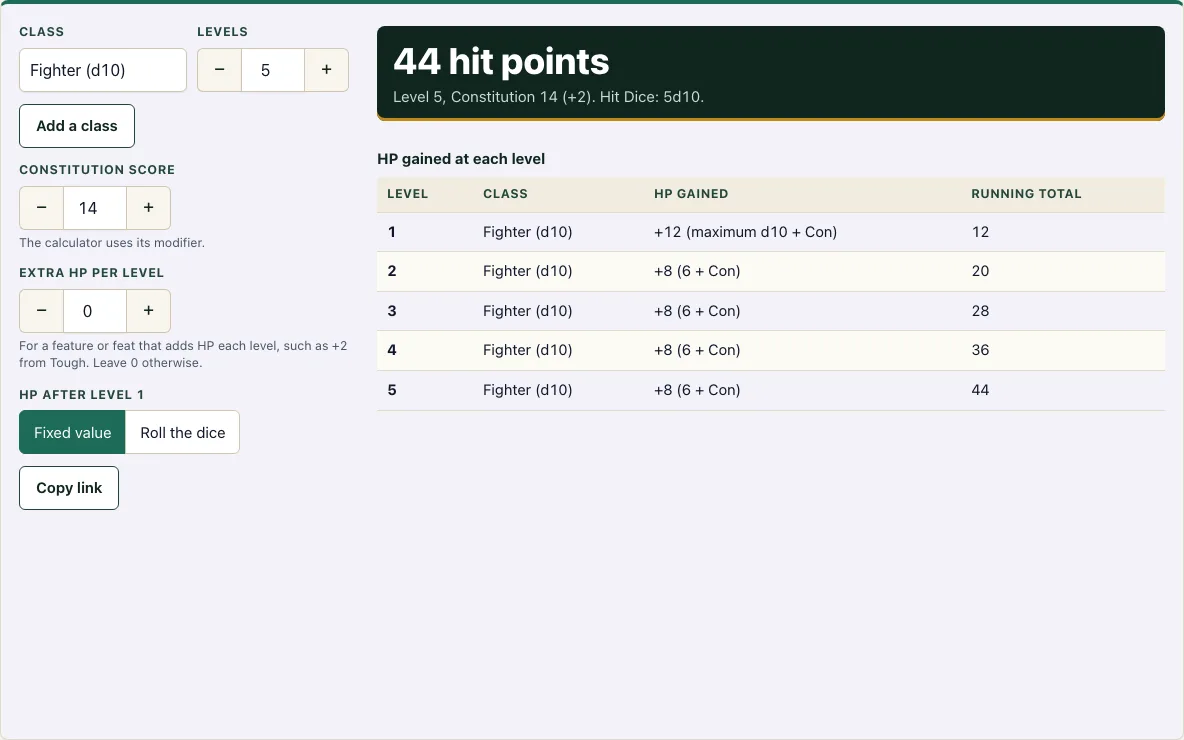
How to use the 5e HP calculator
- In the Class row, choose your class. Use the Levels stepper to set how many levels you have in it, from 1 to 20.
- For a multiclass character, click Add a class and set the class and levels on the new row. Click Remove on any extra row you don’t need. Rows are read from top to bottom, so put the class you started with first.
- Enter your Constitution score. The tool turns it into the modifier for you.
- Enter a number in Extra HP per level if a feature adds HP at every level, such as the Tough feat. Leave it at 0 for a plain character.
- Under HP after level 1, choose Fixed value to use the average-based number for each die, or Roll the dice to roll each level above 1. Click Roll again to get a new set of rolls.
- Read the large N hit points figure. Below it, check the total level, your Constitution and its modifier, and the Hit Dice, such as 5d10.
- Scroll to the HP gained at each level table. It lists the level, class, HP gained and running total, so you can check each step.
To keep your settings, click Copy link. The link stores them in the address, so opening it later shows the same character. Rolled results stay the same with the same link.
How do you calculate hit points in 5e? (HP calculator formula)
Your hit points at level 1 are the largest value on your class’s Hit Die plus your Constitution modifier. At every later level, you add either a roll of that Hit Die or its fixed value, plus your Constitution modifier.
This rule comes from the SRD 5.2.1 (p. 22). The tool applies it to each level, then adds any Extra HP per level, and the sum is your total.
What is the fixed HP value for each class?
Each class has one Hit Die: Barbarian d12; Fighter, Paladin and Ranger d10; Bard, Cleric, Druid, Monk, Rogue and Warlock d8; Sorcerer and Wizard d6. The fixed value is half the die plus 1. That gives 7 for a d12, 6 for a d10, 5 for a d8 and 4 for a d6.
How does Constitution affect HP?
Your Constitution modifier is added at every level, so it has a larger effect the more levels you have. The tool calculates it as the score minus 10, divided by 2, rounded down. A score of 14 gives +2, and a score of 8 gives -1.
The tool never gives less than 1 HP for a level, even when the modifier is negative.
How is HP calculated when multiclassing?
Only the first level of the first class gets the maximum die value. Every later level, in any class, uses either the fixed value or a roll of that class’s Hit Die, plus your Constitution modifier.
Because of this, the order of your classes changes your total. Total levels are capped at 20 across all classes.
Example: Fighter 5 / Wizard 3 with Constitution 14
With Constitution 14 (+2) and the fixed value each level, a Fighter (d10, fixed 6) takes 10 + 2 = 12 HP at level 1, then 6 + 2 = 8 for each of the next 4 Fighter levels, which is 32. Three Wizard levels (d6, fixed 4) add 4 + 2 = 6 each, which is 18. The total is 12 + 32 + 18 = 62 HP. Start as a Wizard instead and level 1 gives 6 + 2 = 8, the next 2 Wizard levels give 12, and 5 Fighter levels give 40, so the total is 60 HP.
Should I roll or take the average for HP?
Taking the fixed value gives the same HP every time and is the simplest choice for planning. Rolling gives a random result that can be higher or lower at each level, which some tables use for a more varied feel.
The tool’s rolls are repeatable: the same link gives the same rolls, and Roll again gives a new set.
How this tool works and where the numbers come from
Level 1 hit points are the class’s Hit Die maximum plus the Constitution modifier. Each later level adds a roll of the Hit Die or its fixed value (half the die plus 1), plus the Constitution modifier, with a minimum of 1 per level. In a multiclass build only the first character level gets the maximum die. This is the SRD 5.2.1 rule.
Sources
- Wizards of the Coast (2025). System Reference Document 5.2.1 (Level 1 Hit Points by Class; Fixed Hit Points by Class; Level Advancement). Licensed CC-BY-4.0 (SRD v5.2.1 (published 2025-05-01); page last updated 2026-03-02) · checked
- Wizards of the Coast (2025). SRD 5.2.1, PDF edition (SRD 5.2.1) · checked
- Creative Commons (2013). Attribution 4.0 International (CC BY 4.0) licence of the SRD (4.0 International) · checked
Frequently asked questions
Can this 5e HP calculator handle multiclass characters?
Yes. Click Add a class to add a row for each class, and use the Levels stepper on each row. The tool applies the first-level rule to the first row and uses fixed values or rolls for all other levels.
What if my Constitution score gives a negative modifier?
The tool still works. It subtracts the modifier at each level, but it never gives less than 1 HP for a single level.
How do I roll for hit points in D&D 5e?
At level 1 you do not roll: you take the highest number on your class’s Hit Die plus your Constitution modifier. At each later level, roll the Hit Die (for example 1d10 for a Fighter), add your Constitution modifier, and add the result to your total, with a minimum of 1 HP per level. Choose Roll the dice in the tool to do this for every level at once, or take the fixed value instead.
How do I add HP from the Tough feat?
Enter 2 in Extra HP per level. The tool adds 2 at every level, so the total increases by twice your total level count.
Are my character’s settings saved?
Only if you click Copy link, which stores your settings in the page address. Nothing is uploaded to a server, so keep the link if you want to return to the same character.
Why is my level 1 HP higher than the other levels?
At level 1 you take the highest number on the Hit Die instead of the fixed value or a roll. A Fighter with Constitution 14 gets 12 at level 1 (10 plus 2) but 8 at each later level (6 plus 2) with the fixed value. The table shows how each level was worked out.
Does the order of classes change my HP?
Yes. The first class in the list gives the level 1 maximum, so putting a d12 or d10 class first gives more HP than starting with a d6 class. Fighter 3 / Wizard 2 with Constitution 14 has 40 HP, while Wizard 2 / Fighter 3 has 38 HP, because it starts with 6 + 2 = 8 at level 1.
Related tools
- Character creator: Build a full character, including class, species and background, before you work out the hit points.
- Character sheet: Record your HP, Hit Dice and other stats on one page once you have your total.
- Point buy calculator: Spend points on your ability scores to get the Constitution score you enter here.
- Stat roller: Roll your ability scores, including Constitution, if you prefer dice to point buy.
- Dice roller: Roll any dice you need at the table, such as a d10 or d12 for a level-up roll.
- Exhaustion: Check the exhaustion rules, because each level of exhaustion changes your D20 Tests and Speed.
- Character sheet PDF: Get a printable sheet to write your HP and level-up totals on.