
DnD Exhaustion
Choose an exhaustion level and your base Speed to see its effects under the 2024 and 2014 rules.
| Level | D20 Tests | Speed |
|---|---|---|
| 1 | −2 | 25 ft |
| 2 | −4 | 20 ft |
| 3 | −6 | 15 ft |
| 4 | −8 | 10 ft |
| 5 | −10 | 5 ft |
| 6 | Dies | — |
Recent
Your last 10 settings, saved only in this browser. Nothing is uploaded.
How to use the 5e Exhaustion Tool
- Tap a level under Exhaustion level, from 0 (no exhaustion) to 6.
- In the Base Speed (ft) box, enter the creature’s normal Speed. It starts at 30.
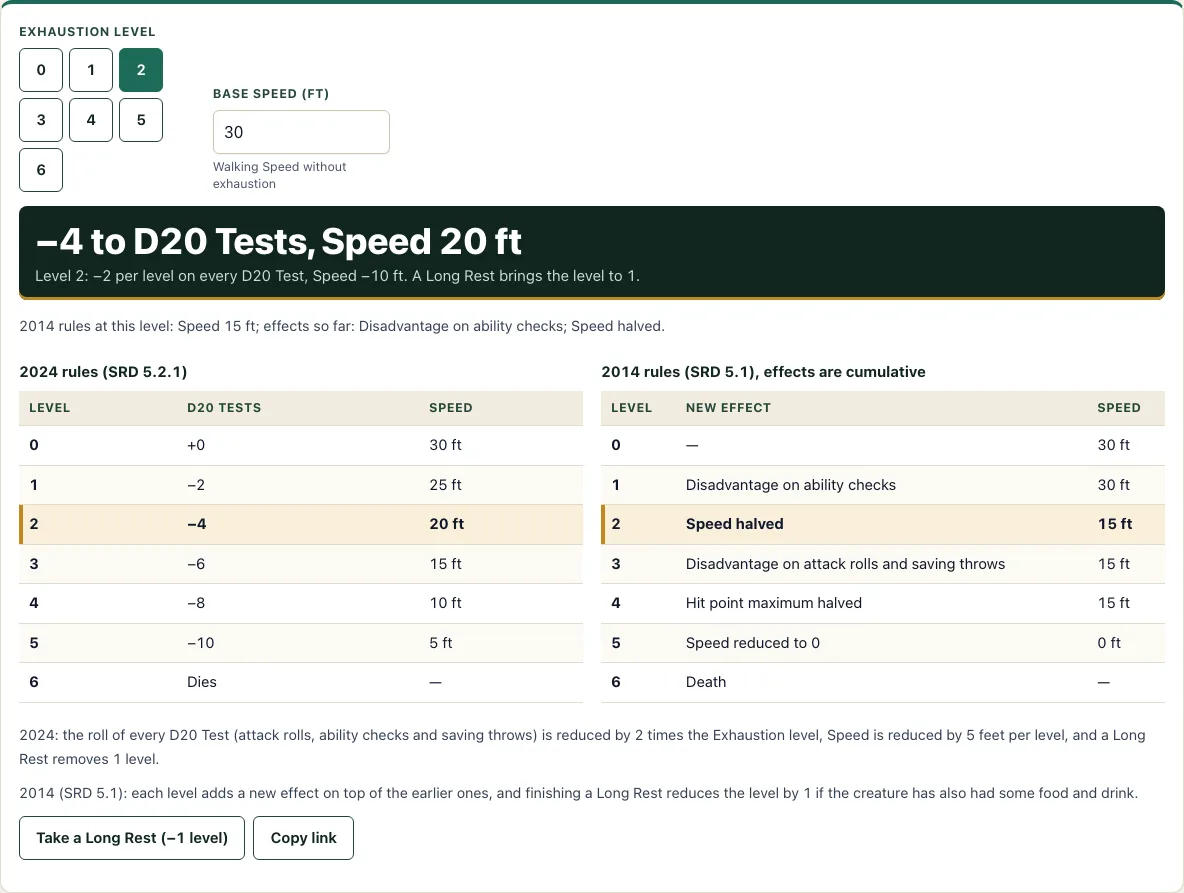
- Read the result line. For example, level 3 with base Speed 30 shows “−6 to D20 Tests, Speed 15 ft”, with a note that a Long Rest brings the level to 2.
- If the level is 6, the result says the creature dies. If the level is 0, it says there is no exhaustion.
- Read the two tables below the answer. The first is the 2024 table at your base Speed and the second is the 2014 table from SRD 5.1; the row of the current level is highlighted.
- After a Long Rest, tap Take a Long Rest (−1 level) to lower the level by one.
Below the answer, the tool shows what the same level does under the 2014 rules, so a table still using the older rules can compare. Scroll down to see the 2024 and 2014 tables side by side, with the row for the current level highlighted in both. Changing the base Speed updates every row of both tables at once. Copy link stores the level and base Speed, so you can send the exact state to a player or open it again later.
How does exhaustion work in 5e?
Exhaustion is a condition with six levels. Each level adds a penalty, and the penalties build on each other, so a creature at a higher level keeps every effect of the levels below it. A creature at level 0 has no exhaustion at all.
Under the 2014 rules (SRD 5.1), each level brings a fixed effect. Level 1 gives disadvantage on ability checks. Level 2 halves Speed. Level 3 gives disadvantage on attack rolls and saving throws. Level 4 halves the hit point maximum. Level 5 reduces Speed to 0. Level 6 means death. Finishing a long rest reduces the level by 1, but only if the creature has also had some food and drink.
What changed in the 2024 exhaustion rules?
The 2024 rules (SRD 5.2.1) replace the list of effects with two formulas. The roll of every D20 Test drops by 2 times the exhaustion level. D20 Tests include attack rolls, ability checks and saving throws. Speed drops by 5 feet times the level. A creature dies at level 6, and finishing a Long Rest removes 1 level.
Here is how the formulas work with a base Speed of 30. At level 3, the penalty is 2 × 3 = 6 on every D20 Test, and Speed drops by 5 × 3 = 15 feet, leaving 15 ft. At level 5, the penalty is −10 on every D20 Test, and Speed drops by 25 feet, leaving 5 ft. Under the 2014 rules, the same level 5 gives Speed 0, disadvantage on checks, attacks and saves, and a halved hit point maximum.
Speed never goes below 0. A creature with base Speed 20 at level 5 under the 2024 rules has Speed 0, not a negative number.
What does each level do at 30 ft Speed?
Under the 2024 rules, a creature with a Speed of 30 ft has these numbers. Level 1: −2 to D20 Tests and 25 ft. Level 2: −4 and 20 ft. Level 3: −6 and 15 ft. Level 4: −8 and 10 ft. Level 5: −10 and 5 ft. Level 6: the creature dies. The table above the tool’s answer on a fresh page lists the same rows, and the tool recalculates them for any base Speed you type.
How this tool works and where the numbers come from
Under the 2024 rules (SRD 5.2.1) the roll of every D20 Test is reduced by 2 times the exhaustion level and Speed by 5 feet times the level, never below 0, with death at level 6 and 1 level removed by a Long Rest. The 2014 table is shown beside it from SRD 5.1. Both are computed from the base Speed you enter.
Sources
- Wizards of the Coast (2025). System Reference Document 5.2.1, Rules Glossary: Exhaustion. Licensed CC-BY-4.0 (SRD v5.2.1 (published 2025-05-01); page last updated 2026-03-02) · checked
- Wizards of the Coast (2023). System Reference Document 5.1 (2014 exhaustion table). Licensed CC-BY-4.0 (SRD 5.1) · checked
Frequently asked questions
How do you get rid of exhaustion?
Under the 2024 rules, finishing a Long Rest removes 1 level. The Take a Long Rest (−1 level) button in the tool does this for you. Under the 2014 rules, a long rest only reduces the level if the creature also had some food and drink.
What happens at exhaustion level 6?
A creature dies at exhaustion level 6 under both the 2024 and 2014 rules. The tool shows this as a message in place of the usual numbers.
How does exhaustion affect speed?
Under the 2024 rules, Speed drops by 5 feet for each level, so level 2 takes 10 feet off. Under the 2014 rules, Speed is halved at level 2 and reduced to 0 at level 5. Speed never drops below 0.
Does the tool use the 2014 or 2024 rules?
It uses both. The main result follows the 2024 rules. Below it, the tool shows the 2014 effects for the same level. The two tables sit side by side, and the row for the current level is highlighted in both.
Does exhaustion penalize attacks and saving throws in 2024?
Yes. Under the 2024 rules, the −2 per level penalty applies to every D20 Test, including attack rolls, ability checks and saving throws. Under the 2014 rules, the penalty is disadvantage on attacks and saves from level 3 onward.
Related tools
- Conditions: Look up the rules for other conditions, such as Poisoned or Stunned, when a creature has more than one effect at once.
- Initiative tracker: Keep turn order and track each creature’s status during combat.
- HP calculator: Work out a character’s hit points by class, level and Constitution.
- DM screen: Keep common rules and tables handy at the table.
- Damage calculator: Estimate how much damage an attack or spell deals to a target.
- Encounter calculator: Gauge how difficult an encounter is before you run it.