
DnD Encounter Calculator
Enter your party and the monsters, and get the encounter's difficulty from the SRD 5.2.1 XP budget.
| Character level | Low | Moderate | High |
|---|---|---|---|
| 1 | 50 | 75 | 100 |
| 2 | 100 | 150 | 200 |
| 3 | 150 | 225 | 400 |
| 4 | 250 | 375 | 500 |
| 5 | 500 | 750 | 1,100 |
| 6 | 600 | 1,000 | 1,400 |
| 7 | 750 | 1,300 | 1,700 |
| 8 | 1,000 | 1,700 | 2,100 |
| 9 | 1,300 | 2,000 | 2,600 |
| 10 | 1,600 | 2,300 | 3,100 |
| 11 | 1,900 | 2,900 | 4,100 |
| 12 | 2,200 | 3,700 | 4,700 |
| 13 | 2,600 | 4,200 | 5,400 |
| 14 | 2,900 | 4,900 | 6,200 |
| 15 | 3,300 | 5,400 | 7,800 |
| 16 | 3,800 | 6,100 | 9,800 |
| 17 | 4,500 | 7,200 | 11,700 |
| 18 | 5,000 | 8,700 | 14,200 |
| 19 | 5,500 | 10,700 | 17,200 |
| 20 | 6,400 | 13,200 | 22,000 |
Recent
Your last 10 settings, saved only in this browser. Nothing is uploaded.
This free DnD encounter calculator rates how hard a 5e fight will be for your party as Low, Moderate or High, using the XP budgets in SRD 5.2.1. It also tells you how much XP is left under each budget and warns about common problems such as too many creatures. You enter your characters and their levels, add the monsters with their Challenge Ratings, and the page shows the rating along with the XP left in each budget.
It runs in your browser, so there is no sign-up and nothing is uploaded. It works on a phone too, so you can check an encounter at the table or while you plan.
How to use the 5e Encounter Calculator
- In the Party section, set the Characters stepper to the number of characters in your group.
- Open the Level menu for that group and choose a level from 1 to 20.
- If your party has mixed levels, click Add characters of another level and set the count and level for the new row. Use the small x to remove a row.
- In the Monsters section, open the Challenge Rating menu and pick a CR. Each option shows its XP, such as “CR 1 (200 XP)”.
- Set the How many stepper to the number of that monster.
- To add a different kind of monster, click Add monsters and repeat steps 4 and 5.
- Read the rating line at the top of the results, then check the XP Budget for this party table to see the XP left under Low, Moderate and High.
- Read any warnings under the table before you run the fight.
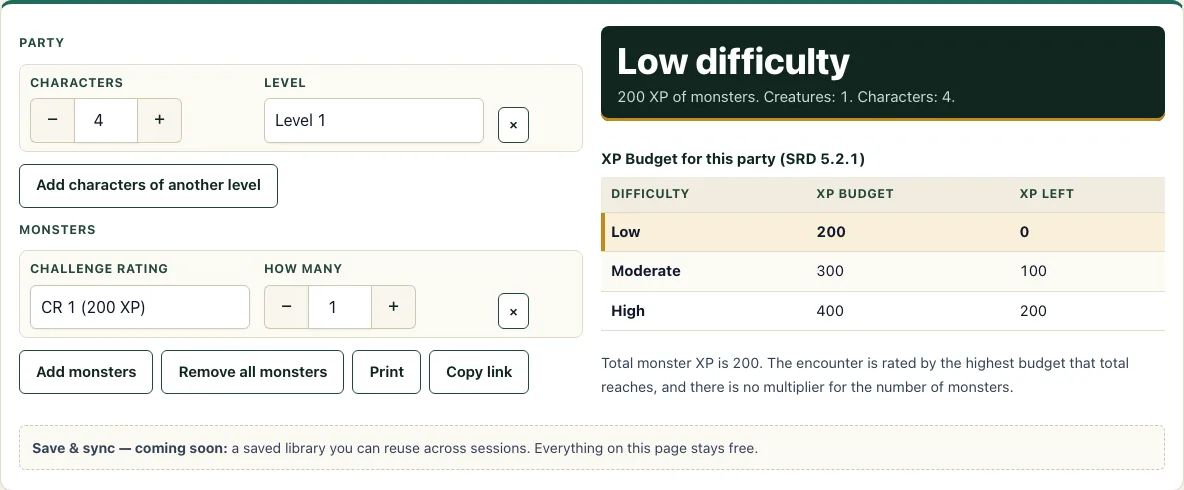
The page loads with 4 level 1 characters against one CR 1 monster, which shows Low difficulty. Use Remove all monsters to clear the monster rows and start again. Print gives you a paper copy, and Copy link shares the exact encounter, because the settings are kept in the page address.
How do you calculate encounter difficulty in 5e?
You add up the XP of every monster in the encounter, then compare that total with the party’s XP budget for each difficulty. The rating is the lowest difficulty whose budget the total fits in, because the SRD builds an encounter of a given difficulty by spending that budget without going over: a total up to the Low budget is Low, above Low up to Moderate is Moderate, and above Moderate up to High is High. The rules for this are in SRD 5.2.1, Combat Encounters (p. 202).
Each character level has an XP budget per character for each difficulty. A party’s budget is the sum of those amounts across all its characters. At level 1 the budgets per character are 50 (Low), 75 (Moderate) and 100 (High). At level 3 they are 150, 225 and 400. At level 20 they are 6,400, 13,200 and 22,000.
Worked example 1: four level 1 characters have a Low budget of 200 XP (4 × 50). One Bugbear Warrior (CR 1, 200 XP) uses exactly 200 XP, so the encounter is Low with 0 XP left. Moderate is 300 XP, so 100 XP is left, and High is 400 XP, so 200 XP is left.
Worked example 2: five level 3 characters have a Moderate budget of 1,125 XP (5 × 225). Two Druids (CR 2, 450 XP each) and nine Stirges (CR 1/8, 25 XP each) cost 900 + 225 = 1,125 XP, which is exactly Moderate.
Worked example 3: six level 15 characters have a High budget of 46,800 XP (6 × 7,800). Two Adult Red Dragons (18,000 XP each) and two Fire Giants (5,000 XP each) cost 46,000 XP. That is above the Moderate budget (32,400) and within the High budget, so the rating is High, which is how the SRD itself labels this example.
What is an XP budget?
An XP budget is the amount of monster XP a party can face at a given difficulty. It is worked out per character from their level, then added up for the whole party. The SRD gives a budget for Low, Moderate and High at every level from 1 to 20.
Budgets are only compared with the total XP of the monsters. Once you know the total, the calculator checks it against the three budgets. If the total is above the High budget, the page says it is above High, because the SRD has no category beyond High.
What do the warnings mean?
Three checks run under the table. One fires when there are more than two creatures per character, one when a monster’s CR is higher than the party’s average level, and one when a CR 0 monster is included. None of them changes the rating; they point at fights that may play differently from what the XP suggests.
Frequently asked questions
Do you multiply XP for more monsters?
No. In these rules the monsters’ XP values are added together, and that sum is compared with the budgets. There is no multiplier for the number of monsters.
How many monsters is too many?
The rules do not set a fixed number. The calculator shows a warning when there are more than two creatures per character. The difficulty rating still depends only on total XP against the budget.
How much XP is a Low, Moderate or High encounter?
It depends on the party. Four level 1 characters have budgets of 200 (Low), 300 (Moderate) and 400 (High) XP. Use the calculator to see the exact budgets for your own party’s levels and size.
Does the calculator count CR 0 monsters?
Yes. The calculator counts each CR 0 monster as 10 XP. Some CR 0 stat blocks are worth 0 XP, so check the stat block if the exact value matters, and the page shows a warning for CR 0 monsters.
Can parties with mixed levels use it?
Yes. Use Add characters of another level to add a row for each group, for example 3 characters at level 4 and 1 at level 5. The party’s budget is the sum of the budgets of every character.
Can I save or share an encounter?
Yes, with Copy link. The settings are kept in the page address, so anyone who opens the link sees the same encounter.
Related tools
- Encounter builder: For picking monsters from the SRD list by name, CR, type and size and watching the same budget bar.
- Random encounter generator: When you want a random monster group that fits a budget.
- Initiative tracker: For keeping turn order once the fight starts.
- XP chart: For the XP a character needs to reach each level.
- Monster maker: For making a custom creature and giving it a Challenge Rating.
- Damage calculator: To see how likely an attack is to hit and how much damage a turn averages.
- Conditions: For the full text of all 15 conditions.
- DM screen: For printing the tables you look up most, including the XP budget.