
DnD Map Generator
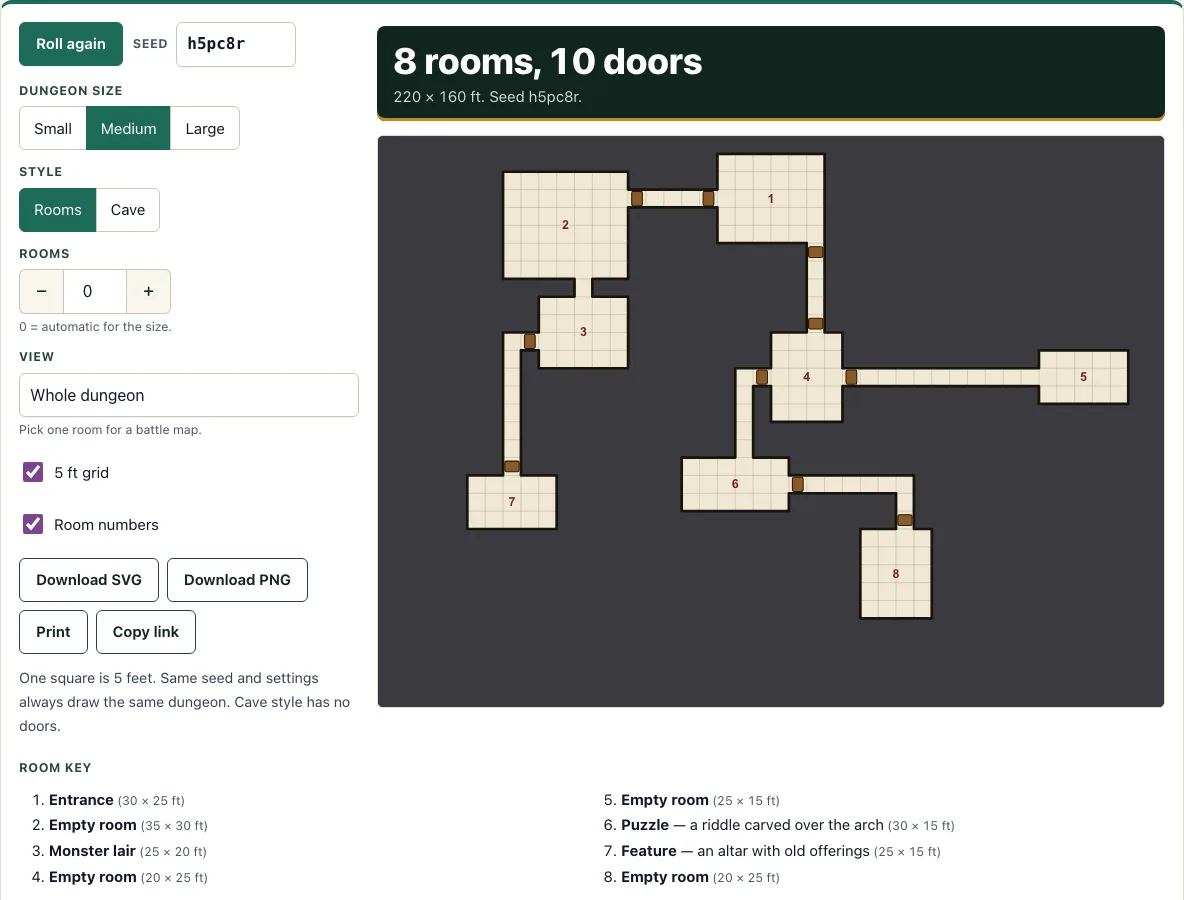
Pick a size and style to get a dungeon map with numbered rooms, doors and a keyed room list.
Recent
Your last 10 settings, saved only in this browser. Nothing is uploaded.
How to use the Dungeon Generator
- Choose a Dungeon size: Small, Medium or Large.
- Choose a Style: Rooms or Cave.
- Set the Rooms stepper. Leave it at 0 for an automatic room count, or enter a number.
- Type a value in the Seed box, or leave it as it is.
- Click the Roll again button to generate a new dungeon.
- Tick the 5 ft grid checkbox to show the grid, and the Room numbers checkbox to label each room.
- Open the View list and choose Whole dungeon, or a room such as Room 2 for its battle map.
- Read the room key under the map for each room’s number, kind, detail and size in feet.
- Click Download SVG or Download PNG to save the view you are looking at, or click Print.
Print sends the map and the room key to your printer. The Rooms stepper runs from 0 to 24, and a number you set replaces the automatic count for the chosen size. The 5 ft grid and Room numbers checkboxes only change how the map is drawn, not the layout, so you can switch them without losing the dungeon. The View list is rebuilt for every new dungeon and lists one entry per room. Copy link shares the current dungeon, because the seed is stored in the page address.
How do I make a battle map
Open the View list and choose a room, such as Room 4. The tool shows that room and the squares around it enlarged on the 5 ft grid, which is the scale used for combat in most tabletop games. Keep the 5 ft grid checkbox ticked if you want the squares marked, then save the view with Download PNG or Download SVG.
Because each square stands for 5 feet, your players can count movement in squares. A room 6 squares wide is 30 feet across, so a character with 30 feet of movement can cross it in a straight line.
How big is a square on a dungeon map
One square on the map is 5 feet on each side. The size you choose sets how many squares the dungeon covers. A Small dungeon is 30 by 24 squares, which is 150 by 120 feet. A Medium dungeon is 44 by 32 squares, or 220 by 160 feet. A Large dungeon is 60 by 44 squares, or 300 by 220 feet.
Rooms are 3 to 8 squares wide and 3 to 6 squares tall, so a room is 15 to 40 feet wide and 15 to 30 feet tall. To find a room’s size in feet, multiply its squares by 5. A room 4 squares wide and 3 squares tall is 20 by 15 feet.
How are rooms and corridors laid out
Each room is a rectangle. Rooms are placed so they do not overlap, then joined by corridors and doors. Every room can be reached from Room 1, which is the entrance.
Rooms are numbered from left to right, then top to bottom, so the numbers follow the way you would read the map. With Rooms set to 0, a Small dungeon has 5 to 7 rooms, a Medium has 8 to 11, and a Large has 12 to 16.
How is each room’s kind chosen
Every room except the entrance gets a kind from our own table: empty room, monster lair, trapped, treasure, feature or puzzle. Feature, trapped and puzzle rooms come with a short description that you can read or adapt. Monster and treasure rooms have no details, so you decide what lives there or what it holds.
The tables are our own and are not taken from any rulebook. You can use the kinds as written or swap any of them for your own ideas.
How does Cave style differ from Rooms style?
Cave style places the chambers and passages the same way as Rooms style, but each chamber is a rough oval instead of a rectangle, passages are uneven and sometimes two squares wide, there are no doors, and the colours are darker and earthier. Choose whichever style fits the setting you are running.
How do I get the same dungeon again
The seed controls the layout. The same seed with the same settings always produces the same dungeon. The seed appears in the page address, so you can return to a dungeon by reopening that address. If you want a new layout, change the seed or click Roll again.
Frequently asked questions
Can I get the exact same dungeon again?
Yes. Keep the same seed and the same settings, and the tool produces the same dungeon every time. Copy link keeps the seed in the address.
Does this work with systems other than 5e?
Yes. It works with any tabletop system that uses 5 ft squares, not only 5e.
Can I print the map and the room key?
Yes. Print sends the map and the room key to your printer.
Can I make a battle map of just one room?
Yes. Open the View list and choose the room you want. That room and the squares around it are shown enlarged on the 5 ft grid.
Can I share a dungeon with my players?
Yes. Click Copy link to copy the address, which holds the seed, and send it to them. They will see the same dungeon with the same settings.
Do I have to use the room kinds as they are?
No. The kinds are a starting point. Monster and treasure rooms have no details, so you fill those in. You can change any kind to suit your game.
Does the tool show the grid on the map?
Only when you tick the 5 ft grid checkbox. Tick Room numbers to label each room as well.
Can I use a generated dungeon map commercially?
Yes. The dungeon map you generate is yours to use commercially, for example as a map in a module or a printable you sell. No credit to this site is needed. See the terms.
Related tools
- Fantasy map generator: use it when you need a wider world or region map instead of a single dungeon.
- Random encounter generator: use it to pick a monster or event to place in a room.
- Encounter builder: use it to balance the monsters you put in a monster lair.
- Loot generator: use it to choose what a treasure room holds.
- Token maker: use it to make tokens for the creatures and characters on your battle map.
- Initiative tracker: use it to keep turn order during a fight in a room.
- DM screen: use it to keep your key rules and tables within reach at the table.
- Monster maker: use it to create a custom creature for a lair or a puzzle room.