
DnD Damage Calculator
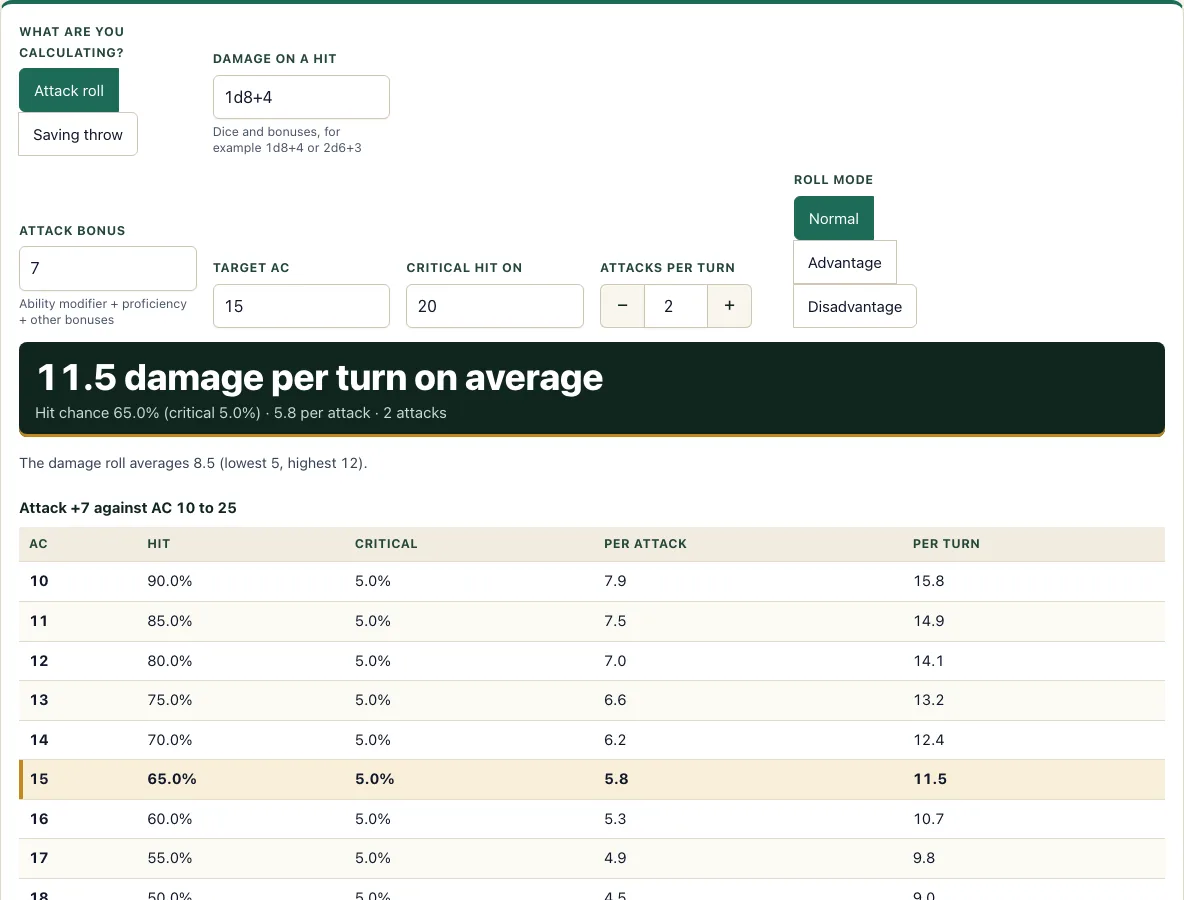
Enter an attack or a save DC and the damage to get its chance to land and the average damage per turn.
Recent
Your last 10 settings, saved only in this browser. Nothing is uploaded.
This free DnD damage calculator estimates how much damage a 5e attacker deals per turn and how often each attack hits. It also handles saving throws for spells and effects that force a save. It runs in your browser, needs no account, and uploads nothing, so you can use it on a phone at the table.
You enter the numbers from your character sheet or stat block, and the tool shows the chance to hit, the critical hit chance, the average damage per attack and the average damage per turn. A table shows how those numbers change against a range of target Armor Classes or save bonuses. Use it to compare weapons, decide between advantage and a bigger bonus, or check how a monster’s attacks stack up against your party’s AC.
How to use the damage calculator
Attack roll mode
- Under “What are you calculating?”, choose Attack roll.
- Enter the Attack bonus, for example +7.
- Enter the Target AC, for example 15.
- Set Critical hit on to 20, 19–20 or 18–20, depending on your weapon or feature.
- Set Attacks per turn from 1 to 20.
- Type the Damage on a hit as dice and bonuses, such as 1d8+4 or 2d6+3.
- Pick Normal, Advantage or Disadvantage as the roll mode.
- Read the results and find your AC row in the highlighted table.
Saving throw mode
- Under “What are you calculating?”, choose Saving throw.
- Enter the Spell save DC and the Target’s saving throw bonus.
- Enter the Damage as dice and numbers, such as 8d6.
- Tick Half damage on a successful save if the spell does that.
- Pick the target’s save as Normal, Advantage or Disadvantage.
Everything updates as you type, and the table under the result highlights the row for your target. The default settings load a common example, so you can change one field at a time and watch the results update. The result and the table change as soon as you edit any field, with no Calculate button to press. Copy link saves all your settings in the link, so you can send the exact setup to a friend or your group.
How do I calculate average damage per turn in 5e?
Multiply the average damage per attack by the number of attacks per turn. Average damage per attack is the chance to hit times the damage on a normal hit, plus the critical chance times the damage on a critical hit, with the critical hit damage counted separately.
For the default example (+7 against AC 15, 1d8+4, 2 attacks), each attack averages 5.75 and the turn averages 11.5. The tool uses average dice values, so this is a long-run estimate, not a prediction for one roll.
How do I calculate DPR (damage per round) in 5e?
DPR is the same number as average damage per turn: the damage you deal in one round, averaged over many rounds. For attacks, add the chance to hit times the average damage of a normal hit to the chance to crit times the extra dice a crit adds, then multiply by the number of attacks. For a spell that forces a save, use the chance the target fails the save times the full damage, plus the chance it succeeds times the half damage if the spell has any.
With 2 attacks at +7 against AC 15, a 65% chance to hit and 1d8+4, each attack averages 5.75, so DPR is 11.5. Compare it with the 22.4 expected damage of the 8d6 spell example below: DPR lets you put a weapon turn and a spell turn on the same scale. For a fight with several monsters, the encounter calculator shows how much damage each side needs to deal.
What is the chance to hit?
The chance to hit is the number of d20 results that meet or beat the target’s AC after your bonus is applied, divided by 20. You need to roll at least AC minus your attack bonus.
With +7 against AC 15, you need 8 or higher, which is 13 of the 20 faces. That gives a 65% chance to hit. A natural 20 always hits and a natural 1 always misses, so with a single d20 the real chance never goes above 95% or below 5%.
How much does advantage help?
Advantage lets you roll two d20s and keep the higher one. You miss only if both rolls miss, so with a 65% chance to hit the miss chance drops from 0.35 to 0.35 × 0.35 = 0.1225. That raises your hit chance to 87.75%.
Disadvantage works the other way. You keep the lower roll, so you hit only if both rolls hit: 0.65 × 0.65 = 0.4225, or 42.25%. Advantage and disadvantage change the chance to hit, not the damage on a hit.
How do critical hits work?
A critical hit happens when you roll a natural 20, or a number inside your critical range. With the default range of 20, that is 1 in 20, or 5% of attacks. Improved critical ranges such as 19–20 (10%) or 18–20 (15%) make crits more common.
On a critical hit, you roll the damage dice twice and add the bonus once. For 1d8+4, a normal hit averages 8.5 damage, while a critical hit averages 9 + 4 = 13. The tool counts the critical chance separately, so the damage per attack includes both outcomes.
What is the average damage of 8d6 or 12d6 in 5e?
The average of 8d6 is 28 and the average of 12d6 is 42: multiply the number of dice by the average of one die. A d4 averages 2.5, a d6 3.5, a d8 4.5, a d10 5.5 and a d12 6.5. A flat bonus is added once, so 8d10+40 averages 8 × 5.5 + 40 = 84.
Type any dice expression in the damage field, for example 8d6 or 2d6+3, and the result line shows its average. A critical hit doubles the dice but not the bonus, so a hit of 2d6+3 averages 10 and a critical hit averages 17.
How do I calculate spell save damage?
Find the chance that the target fails, then multiply by the full damage and add the save damage on a success if the spell does half damage. The target saves when its d20 plus its save bonus meets or beats your spell save DC.
For DC 15 against a +2 save, the target needs 13 or higher, which is 8 of 20 faces. It saves 40% of the time and fails 60%. For 8d6 (average 28) with half damage on a save, the expected damage is 0.6 × 28 + 0.4 × 14 = 22.4.
How this tool works and where the numbers come from
Hit chance is the number of d20 faces that meet or beat the target’s AC after the attack bonus, with a natural 20 always hitting and a natural 1 always missing; advantage takes the higher of two d20s and disadvantage the lower. A critical hit doubles the damage dice only. Average damage uses average dice values. Saving-throw mode uses the chance the target fails the save against the spell save DC. Rules follow the SRD 5.2.1.
Sources
- Wizards of the Coast (2025). System Reference Document 5.2.1 (D20 Tests, Advantage and Disadvantage, Critical Hits). Licensed CC-BY-4.0 (SRD v5.2.1 (published 2025-05-01); page last updated 2026-03-02) · checked
- Wizards of the Coast (2025). SRD 5.2.1, PDF edition (SRD 5.2.1) · checked
- Creative Commons (2013). Attribution 4.0 International (CC BY 4.0) licence of the SRD (4.0 International) · checked
Frequently asked questions
Why does my result differ from the damage I roll at the table?
The calculator uses the average value of each die, such as 4.5 for a d8 and 3.5 for a d6, so it shows the long-run average. A single roll can be much higher or lower than that average.
Can I enter a damage value like “fire 2d6 plus 3”?
No. The damage box accepts only dice and numbers, such as 2d6+3. Any other text triggers a warning, so remove the words and enter just the dice and bonus.
Can I calculate a monster with several attacks?
Yes. Set “Attacks per turn” to the number of attacks in the monster’s action, from 1 to 20. If each attack uses different damage, run the tool once per attack and add the averages together.
Does it include extra damage such as Sneak Attack or a spell rider?
Add the extra dice to the damage box, for example 1d8+4+2d6 for a weapon hit with a 2d6 rider that applies on every hit. Extra dice that only apply sometimes are not modelled, so work out two cases and compare them.
Is anything I enter sent to a server?
No. The tool runs in your browser and nothing you type is uploaded.
Related tools
- Encounter calculator: Use it to judge how hard a fight will be once you know how much damage each side deals.
- Initiative tracker: Use it to keep track of turn order during a combat that you are running.
- Conditions: Use it to check how effects like blinded or restrained change attack rolls and saving throws.
- Monster maker: Use it to build a monster’s stat block, then test its attacks here.
- HP calculator: Use it to work out a character’s hit points by class, level and Constitution.
- DM screen: Use it as a quick reference for rules you need during play.