
DnD Conditions
Read the full text of every 5e condition and keep track of who has which.
| Condition | Main effects |
|---|---|
| Blinded | Can't see; attacks vs you have Adv.; your attacks have Disadv. |
| Charmed | Can't attack the charmer; charmer has Adv. on social checks vs you. |
| Deafened | Can't hear; fail checks that need hearing. |
| Exhaustion | −2 × level to D20 Tests, −5 ft × level Speed; level 6 = death. |
| Frightened | Disadv. on checks and attacks while the source is in sight; can't move closer. |
| Grappled | Speed 0; Disadv. on attacks vs anyone but the grappler. |
| Incapacitated | No actions, Bonus Actions or Reactions; Concentration broken; can't speak. |
| Invisible | Adv. on Initiative; unseen; attacks vs you have Disadv.; yours have Adv. |
| Paralyzed | Incapacitated, Speed 0; fail Str/Dex saves; hits within 5 ft are crits. |
| Petrified | Turned to stone; Incapacitated; Resistance to all damage. |
| Poisoned | Disadv. on attack rolls and ability checks. |
| Prone | Crawl, or stand up for half Speed; Disadv. on attacks; attacks vs you within 5 ft Adv., farther Disadv. |
| Restrained | Speed 0; your attacks Disadv., attacks vs you Adv.; Dex saves Disadv. |
| Stunned | Incapacitated; fail Str/Dex saves; attacks vs you have Adv. |
| Unconscious | Incapacitated, Prone; fail Str/Dex saves; hits within 5 ft are crits. |
Recent
Your last 10 settings, saved only in this browser. Nothing is uploaded.
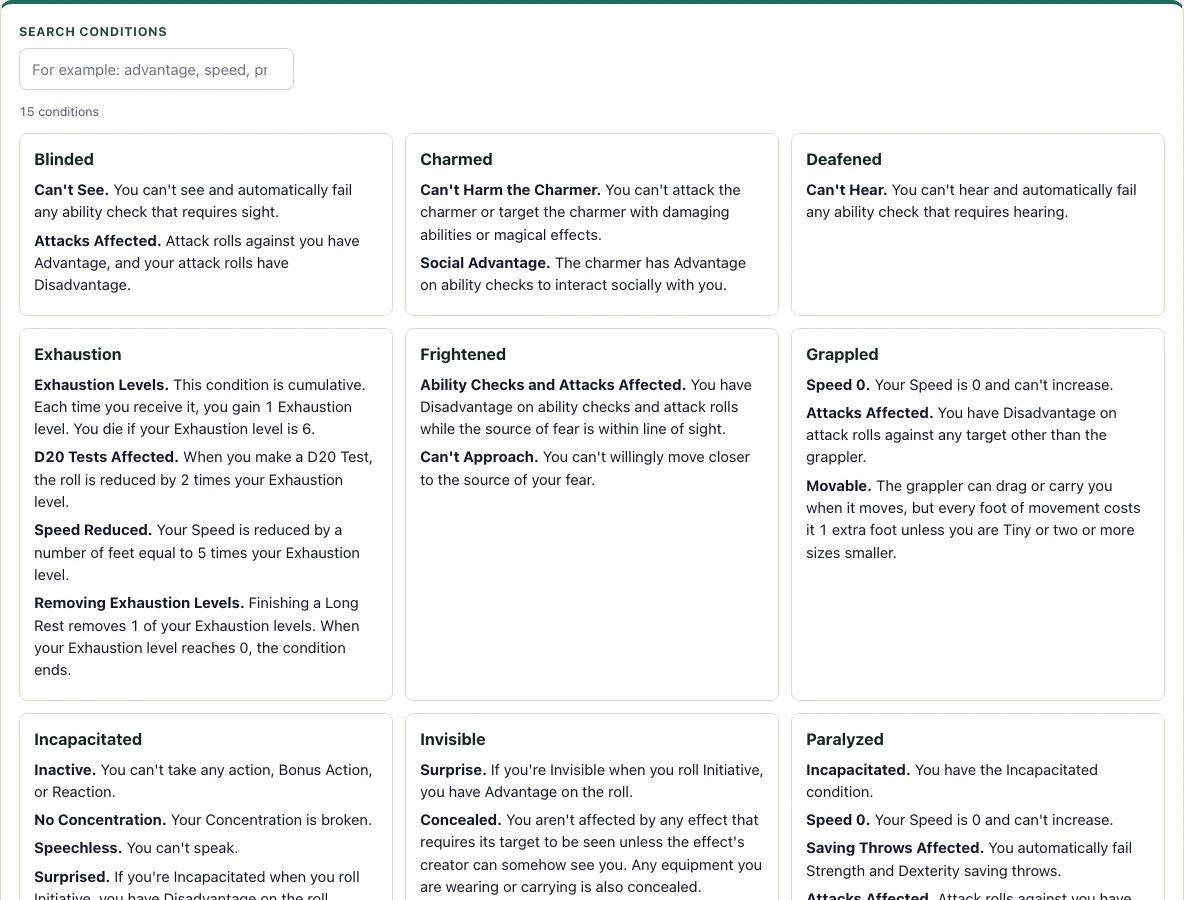
How to use the Conditions Reference
- Type a condition name or a word from its rules into the Search conditions box. For example, type “speed” to see the 7 matching conditions.
- Clear the box to show all 15 cards again.
- Read any card to see the full rules text for that condition.
- Press Print summary table to print the 15-row table of each condition and its main effects.
- Scroll to the tracker below the cards. Type a creature name and press Add creature.
- Open the Add condition menu for that creature and choose a condition.
- Optionally, enter a number in the Rounds box to make the condition timed.
- Press End round after each round. Timed conditions count down by 1, and any that reach 0 are removed.
- Click a condition chip to remove it before its time runs out.
- Press Clear to empty the tracker. The creature list and its conditions are saved in this browser, so closing the page does not lose them.
If you run a fight, add every creature to the tracker first and then apply conditions as spells and attacks land, so the list always shows who is affected. The summary table is the only part that prints, so use the cards for full rules text. Keep the tracker open while you play, because each creature and its conditions stay on the page until you remove them or press Clear.
What are the conditions in 5e?
There are 15 conditions in the SRD 5.2.1 Rules Glossary: Blinded, Charmed, Deafened, Exhaustion, Frightened, Grappled, Incapacitated, Invisible, Paralyzed, Petrified, Poisoned, Prone, Restrained, Stunned and Unconscious. A condition is a state that changes what a creature can do, sense, or how it can be attacked, and a spell, monster ability, or other game effect usually applies it.
Some conditions build on others. Incapacitated is the base for several of them: an Incapacitated creature cannot take actions, Bonus Actions, or Reactions, its Concentration ends, and it cannot speak. Grappled and Restrained both set Speed to 0. Restrained also gives Disadvantage on attack rolls and Dexterity saving throws, and attackers have Advantage against it.
Exhaustion works differently because it adds up. Each level reduces D20 Test rolls by 2 and Speed by 5 feet, and a creature dies at level 6. See the Exhaustion page for the full rules.
What is the difference between Stunned and Paralyzed?
Stunned and Paralyzed both include the Incapacitated condition, so a creature with either one cannot act, take Reactions, or speak. Paralyzed is the more severe of the two. It sets Speed to 0, causes automatic failure of Strength and Dexterity saving throws, gives attackers Advantage, and makes any hit from within 5 feet a Critical Hit.
Stunned also fails Strength and Dexterity saving throws and gives attackers Advantage. It does not include automatic Critical Hits, and that is the main practical difference when you are deciding how dangerous a monster or spell is.
Which conditions give attackers Advantage?
Attack rolls against a Blinded, Paralyzed, Petrified, Restrained, Stunned or Unconscious creature have Advantage. A Prone creature gives Advantage only to attackers within 5 feet and Disadvantage to the rest. Invisible works the other way: attack rolls against an Invisible creature have Disadvantage and its own attack rolls have Advantage.
Two conditions also turn close hits into Critical Hits. Any attack roll that hits a Paralyzed or Unconscious creature is a Critical Hit if the attacker is within 5 feet of it. Search for “Critical Hit” in the box above to see both cards.
How this tool works and where the numbers come from
The cards show the text of the 15 conditions from the Rules Glossary of the SRD 5.2.1, unchanged; the summary table and tracker are written by D20 Desk. The tracker only counts rounds down for conditions you give a duration, and does not apply any condition effects automatically.
Sources
- Wizards of the Coast (2025). System Reference Document 5.2.1, Rules Glossary: Conditions. Licensed CC-BY-4.0 (SRD v5.2.1 (published 2025-05-01); page last updated 2026-03-02) · checked
- Wizards of the Coast (2025). SRD 5.2.1, PDF edition (SRD 5.2.1) · checked
- Creative Commons (2013). Attribution 4.0 International (CC BY 4.0) licence of the SRD (4.0 International) · checked
Frequently asked questions
What does the Prone condition do?
A Prone creature can crawl or stand up by spending half its Speed. Attack rolls against it have Advantage if the attacker is within 5 feet, and Disadvantage otherwise. Its own attack rolls have Disadvantage.
How long do conditions last?
A condition lasts as long as the effect that caused it says, and some last until they are removed. To time one in the tracker, enter a number in the Rounds box. End round counts it down, and it is removed when it reaches 0. Untimed conditions stay until you click their chip.
Is there a Sickened condition in 5e?
No. Sickened is a Pathfinder condition, and it is not in the SRD 5.2.1 list. The closest 5e condition is Poisoned, which gives Disadvantage on attack rolls and ability checks.
Which conditions set Speed to 0?
Five conditions set Speed to 0: Grappled, Paralyzed, Petrified, Restrained and Unconscious. Prone does not, but a Prone creature can only crawl or spend half its Speed to stand up, and if its Speed is 0 it cannot stand up at all. Check each card’s full text for the other effects.
Is the rules text from the SRD?
Yes. The text on the cards is the SRD 5.2.1 Rules Glossary text, licensed CC-BY-4.0. The summary table is shorter and written by D20 Desk.
Where is the tracker data saved?
The tracker list is saved only in the browser you are using. Another browser or device will not show it.
Related tools
- Initiative tracker: Use it to keep turn order for the same encounter while you track conditions here.
- Exhaustion: Read it when you need the full rules for stacking exhaustion levels.
- DM screen: Use it as a quick reference at the table for rules you look up often.
- Monster maker: Use it to build a creature stat block.
- Encounter calculator: Use it to check how difficult an encounter is before you start tracking conditions in combat.
- Dice roller: Use it to roll the saving throws that end or avoid a condition.