
DnD Class Quiz
Answer twelve questions and get all twelve SRD classes ranked, with the facts of your best match.
Recent
Your last 10 settings, saved only in this browser. Nothing is uploaded.
How to use the class quiz
- Scroll through the twelve questions at the top of the page.
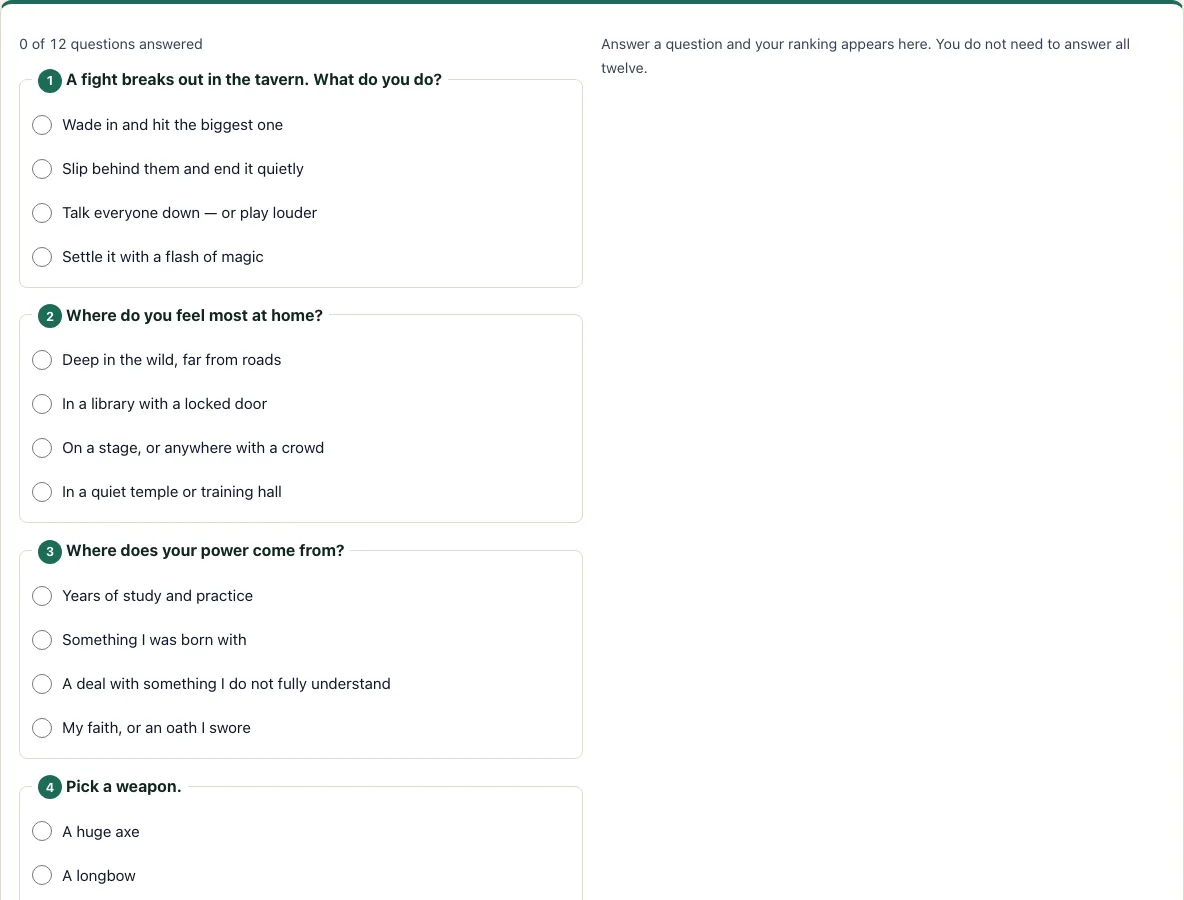
- Read the first question, such as “A fight breaks out in the tavern. What do you do?”
- Tap one of the four answers. The counter shows “N of 12 questions answered.”
- Answer the rest in any order. You can skip questions and come back to them.
- Watch the ranking change after each answer. The top class appears in large type, and the bars below show all 12 classes as a share of the top class.
- The ranking is live, so you never need to press a submit button. If two classes tie, the quiz says so and shows the first one.
- Read the card under the result. It lists the Hit Die, primary ability, saving throw proficiencies, armor and weapon training, number of skills to choose, and magic at level 1.
- Tap “Build a [class] in the character creator” to open the character creator and make that class.
Your choices stay selected while you scroll, and you can change an answer by tapping another option. To return to the start, tap “Start again.” To share your result, tap “Copy link.” The link stores your answers, so the same result opens for anyone you send it to.
What DnD class am I?
The quiz does not read your personality directly. It scores your choices, and each answer gives points to several of the 12 classes in the SRD 5.2.1: Barbarian, Bard, Cleric, Druid, Fighter, Monk, Paladin, Ranger, Rogue, Sorcerer, Warlock and Wizard. The class with the highest total is your match.
Because each answer touches several classes, a single question rarely decides the result. Your pattern across all 12 questions matters more. If you answer only some questions, the ranking is based on those answers alone, so it can shift as you add more.
How do I choose a 5e class?
Start with how you want to play, then check the mechanics. A class’s style comes from its role in a fight, its spells, and its skills, and the card under the quiz result summarizes those facts for the top class. If your result is a caster, check how many spell slots it gets before you commit.
Three facts help compare classes. The Hit Die sets how many hit points you gain: a Barbarian rolls a d12, Fighters, Paladins and Rangers roll a d10, Bards, Clerics, Druids, Monks, Rogues and Warlocks roll a d8, and Sorcerers and Wizards roll a d6. The primary ability tells you which score drives the class, such as Strength or Dexterity. Spellcasting also varies. Bard, Cleric, Druid, Sorcerer and Wizard are full casters. Paladin and Ranger are half casters. Warlock uses Pact Magic. Barbarian, Fighter, Monk and Rogue do not cast spells at level 1.
Once you have a shortlist, read the class chapters in the SRD. The quiz uses only the facts above, and the full features are there.
Why does my result change when I answer more questions?
Every answer adds points, so the order of the ranking can change until the last question. A class that leads after four questions can be overtaken once you answer questions that favour another class. The bars always show points as a share of the top class, so the leader sits at 100% and a close second sits just below it. When the top two are close, read both classes’ facts before you decide.
Frequently asked questions
Which class is best for beginners?
The quiz does not rank classes by difficulty, so it cannot name one as best for beginners. Pick the class that matches the style you enjoy, then read its SRD chapter to see how many features and choices it gives you at level 1.
Can I take a class I did not get?
Yes. The result is a suggestion, and any class can be played with any personality. You can build a character with any class in the character creator, whether or not it was your top match.
What classes are in the 5e SRD?
The quiz covers the 12 classes in the SRD 5.2.1: Barbarian, Bard, Cleric, Druid, Fighter, Monk, Paladin, Ranger, Rogue, Sorcerer, Warlock and Wizard. Each one appears in the ranking, so you can see how close your other matches are.
Who made this quiz?
The questions and the scoring were written for D20 Desk, and the class facts come from the SRD 5.2.1. The quiz is independent and not affiliated with Wizards of the Coast.
Does the quiz save my answers?
Not on a server. The quiz runs in your browser and uploads nothing. If you tap “Copy link,” the link stores your answers so the result can be reopened.
Can I retake the quiz?
Yes. Press Start again to clear every answer, or change any answer and the ranking updates at once.
Do I need an account to use it?
No. The quiz is free, and there is no sign-up.
Related tools
- Character creator: use it to build a character with your chosen class.
- Stat roller: use it to generate ability scores once you know your class.
- Point buy calculator: use it if you prefer to assign ability scores by points rather than rolling.
- Alignment test: use it to explore a moral outlook for your character.
- HP calculator: use it to work out hit points from your class’s Hit Die.
- Character sheet: use it to record your character’s details in one place.
- Languages: use it to look up the languages available to your character.
- Spell list: use it to browse spells once you know whether your class casts them.