
DnD City Generator
Pick a settlement size and roll the place, then reroll any part you do not like.
Recent
Your last 10 settings, saved only in this browser. Nothing is uploaded.
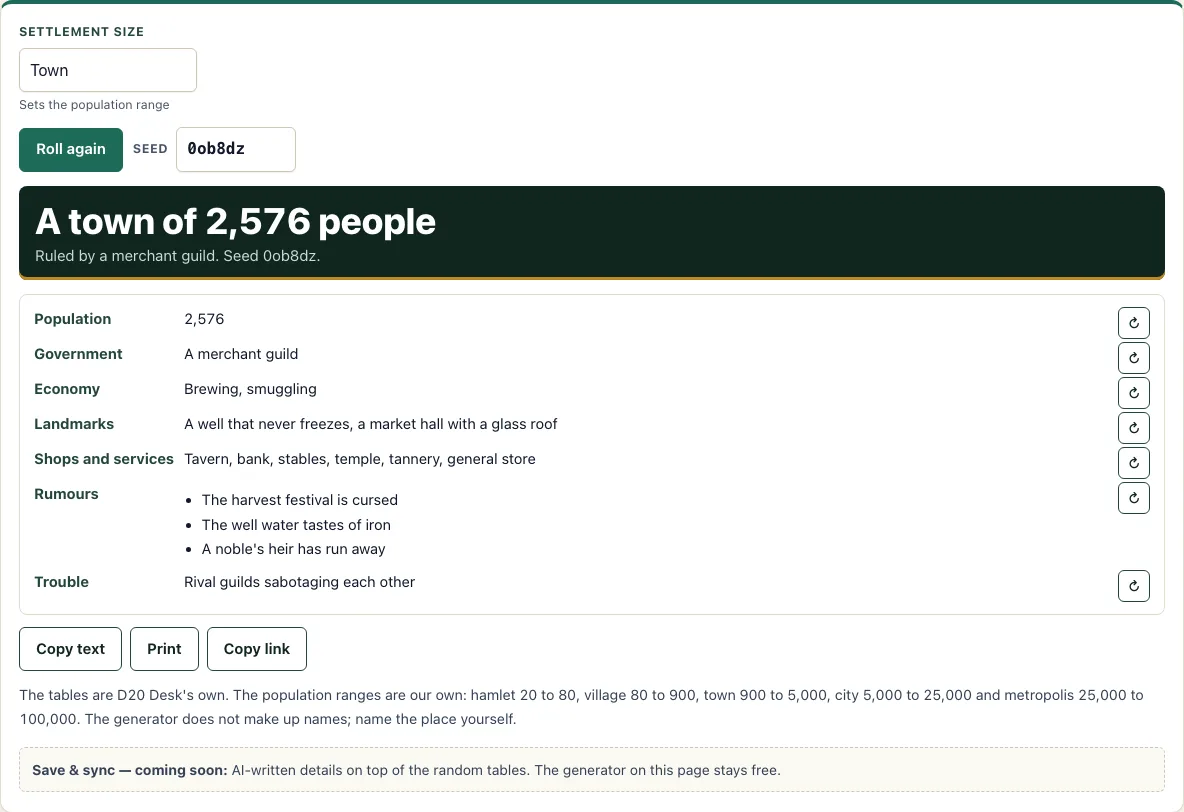
The DnD city generator is a free browser tool that builds a random town or city for your 5e campaign. Pick a settlement size, and it produces a result card with population, government, economy, landmarks, shops and services, rumours and trouble. It runs in your browser with no account or sign-up, so you can open it and start rolling straight away.
Use it when your players reach a place you have not planned, or when you want a quick starting point for a town you will build out yourself. The size starts on Town, so if you need a dnd town generator result, leave it there. You can also choose anything from a hamlet to a metropolis. Every line can be rerolled on its own, so you keep what fits your world and replace what does not.
How to use the City Generator
- Open the Settlement size menu and choose Hamlet, Village, Town, City or Metropolis. It starts on Town.
- Read the result card. It shows Population, Government, Economy (2 items), Landmarks, Shops and services, Rumours (3) and Trouble.
- Press the reroll button beside any line you want to change. The other lines stay the same.
- Press Roll again to generate a completely new settlement at the same size.
- Type a number into the Seed box to get a repeatable result. The same seed gives the same town.
- Change the size whenever you need to. This clears any lines you have rerolled, so set the size first and reroll afterwards.
- Name the town with the town name generator. This page does not name the settlement, its shops or its people.
Use Copy text to copy the result as plain text, Print to make a paper copy for the table, or Copy link to save your seed and rerolls in the link. Open that link later to return to the same version. The tool also works on phones and tablets.
Rerolling one line never changes the others, so you can keep a government you like and keep rerolling the Economy or Rumours until they suit your story. The seed and the rerolls you made are in the link, and Roll again starts a new settlement with no rerolls.
How big is a town or city in 5e?
This tool uses its own population bands, not rules from the SRD. Hamlet is 20-80 people, Village 80-900, Town 900-5,000, City 5,000-25,000 and Metropolis 25,000-100,000. The generator rolls a number inside the band you choose, so two towns at the same size will not have the same population.
Size also sets how many shops the settlement has. A hamlet gets 1 shop, a village 2-4, a town 5-8, and a city or metropolis 9-14. Each shop is picked from a list of 14 types, including inn, tavern, blacksmith, temple, alchemist and bank. City and metropolis share the same shop range, so the jump between them is in population rather than in shops.
Is there a DnD town generator and village generator?
Yes. Pick Hamlet, Village or Town as the size and the same tool works as a DnD town generator or village generator. Each size changes the population and the number of shops, and you can draw where it sits with the fantasy map generator.
What does a settlement need?
A settlement needs people, a way to be governed, a way to earn a living, places that meet everyday needs, and sources of pressure that give the players something to do. The tool models these as separate result lines: Government, Economy, Landmarks, Shops and services, Rumours and Trouble. Each one draws from its own table, so the lines do not dictate each other.
Government has 8 types and Economy has 12, with two economic items per roll. Landmarks have 10 options, with one for a hamlet and two for every larger size. Rumours have 10 options, and three appear on each card. Trouble has 10 sources, one of which is “none - for now.” That result is a valid answer. It lets a quiet town stay quiet until your story needs it.
Because the lines are separate, you can keep a government you like and reroll the economy until it suits the story. All tables are D20 Desk’s own, so you can swap out any result you do not want.
How do I use the result in play?
Treat the card as a sketch. Pick the line that matters most for the evening, such as the Trouble or one of the Rumours, and build the session around it; the other lines are colour you can use if the players ask. Give the place a name before the session, and decide who among the shops and officials the players are likely to meet first.
If you want a second town for contrast, change the seed or the size and compare the two cards. Keep both links so you can return to either one.
Frequently asked questions
Does the generator name the town?
Not on this page. Use the town name generator for hamlet, village, town and city names, and the DnD name generator for the people. Or use a name that already exists in your campaign.
How do I get the same town again?
Type a number into the Seed box before you roll. The same seed gives the same result. Copy link also stores your seed and rerolls, so you can return to that exact version later.
Is this made by Wizards of the Coast?
No. D20 Desk is not affiliated with Wizards of the Coast. The site is built on the SRD 5.2.1, which is licensed CC-BY-4.0. The city tables are D20 Desk’s own, not tables from the SRD.
Does the tool upload my settlement anywhere?
No. Everything runs in your browser, and nothing is uploaded.
Can I use it on my phone during a game?
Yes. The tool works on phones and tablets, so you can roll a settlement at the table without a laptop.
Can I get shop stock and NPCs for the town?
Yes. The shop generator creates a shop’s stock, and the NPC generator creates people who live in the settlement. Use them together with this tool to fill out the town.
Can I use a generated city commercially?
Yes. A city you generate is yours to use commercially, for example in a published setting or a paid map pack. See the terms.
Related tools
- Shop generator: Use it to create the stock and details for one of the town’s shops.
- NPC generator: Use it to create the people who live, work and cause trouble in the settlement.
- Dungeon generator: Use it when your party leaves town and needs somewhere to explore.
- Fantasy map generator: Use it to place your settlement in a wider region.
- Random encounter generator: Use it for surprises on the road between towns.
- Quest generator: Use it to turn a rumour or trouble from the town into an adventure hook.