
DnD Character Sheet
Type your character's scores, class and gear to get a 5e sheet that calculates every number, ready to print or save as a fillable PDF.
Recent
Your last 10 settings, saved only in this browser. Nothing is uploaded.
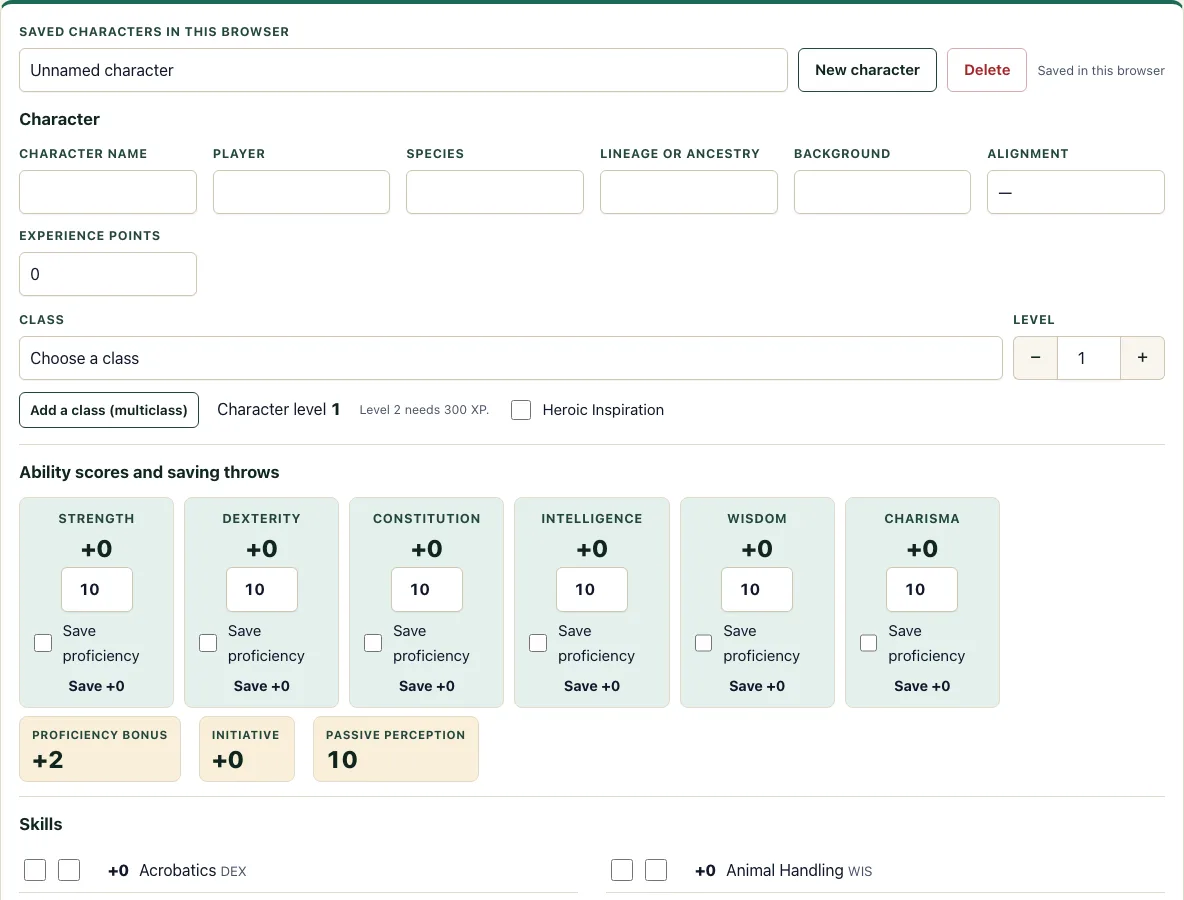
How to use the 5e character sheet
- Type the character name, player, species, lineage, background, alignment, and experience points.
- Choose a class and level in the first class row. For a multiclass character, add more rows, up to six in total. Each row takes a level from 1 to 20.
- Enter the six ability scores. Tick Save proficiency on any saving throw your character is trained in.
- Press “Fill from first class” to set saving throw proficiencies, Hit Dice, spellcasting ability, spell slots, and HP maximum from your classes and levels. Do this after the scores, because the HP maximum uses Constitution.
- In the skills list, tick Prof. for each skill you are trained in. Tick Exp. for expertise, which also ticks Prof.
- Leave “Armor Class from armor” empty to use 10 plus your Dexterity modifier. Enter the armor’s total AC to override it, and tick the shield box if you carry one.
- Enter your hit point maximum, or press “Suggest HP maximum” to fill it from your classes and Constitution.
- In the spellcasting section, confirm the ability, then press “Set slots from my classes”. Add cantrips and prepared spells in the text boxes.
- Fill in the attacks table, equipment, coins, features, proficiencies, languages, and personality details.
Print gives you a clean printable sheet. Download fillable PDF builds a Letter or A4 PDF with the form fields filled in. If you made a character in the 5e character creator, open it here with “Open in character sheet”.
How do I fill out a 5e character sheet?
Start with the six ability scores, because most other numbers come from them. Each modifier is floor((score − 10) ÷ 2), rounded down. A score of 8 gives −1, a score of 10 or 11 gives 0, and a score of 16 gives +3. Rounding down matters: a score of 9 gives −1, not 0.
Next comes the proficiency bonus, which depends on your total character level. It is +2 at levels 1 to 4, +3 at 5 to 8, +4 at 9 to 12, +5 at 13 to 16, and +6 at 17 to 20. A saving throw adds the proficiency bonus when you are trained in that save. A skill adds it when Prof. is ticked. Expertise adds it twice, so an Exp. skill adds double the proficiency bonus on top of the ability modifier.
How is spell save DC calculated?
Spell save DC = 8 + ability modifier + proficiency bonus. The ability modifier comes from your spellcasting ability, which is the class default unless you choose another. Spell attack bonus = ability modifier + proficiency bonus, so it uses the same two numbers without the 8.
Here is a worked example. A level 5 Wizard with Intelligence 16 has an Intelligence modifier of +3 and a proficiency bonus of +3. The spell save DC is 8 + 3 + 3 = 14, and the spell attack bonus is +3 + 3 = +6.
Can I save my character sheet?
Yes. The sheet saves automatically in your browser using local storage. A list of saved characters lets you create a new one, open one, or delete one. Clearing your site data removes them, so use Export JSON to download a backup file. Import JSON loads an exported file as a new character.
What does multiclassing change on the sheet?
The sheet adds the levels of all class rows into one character level, and that total sets the proficiency bonus. For example, a Fighter 3 and Wizard 2 is character level 5, so the proficiency bonus is +3. Hit Dice are listed per class, such as 3d10 + 2d6, and “Suggest HP maximum” uses each class’s own hit die. If your character is tired, see the exhaustion rules for how each level changes your rolls.
Spell slots for several spellcasting classes follow the SRD multiclass table. “Set slots from my classes” fills them in, and you can still edit any slot by hand.
What do Armor Class, initiative, and passive Perception use?
Armor Class uses the armor rule described above: 10 plus Dexterity modifier when the armor field is empty, or the armor’s total AC when you enter it. The shield checkbox adds 2 on top of either value. Initiative equals the Dexterity modifier.
Passive Perception is 10 plus your Perception skill bonus, so a character with Wisdom 14 who is proficient at level 1 has 10 + 2 + 2 = 14.
Carrying capacity is Strength score × 15 pounds, and push, drag, or lift is double that. A character with Strength 16 carries 240 pounds and can push, drag, or lift 480 pounds.
Frequently asked questions
Can I print the 5e character sheet?
Yes. The Print button opens a clean printable version with your ability scores, saves, skills, attacks, spells and notes. For a paper form with fields you can write on, use Download fillable PDF instead.
Does the sheet work on a phone?
Yes. It runs in a mobile browser, and the fields stack in one column on a narrow screen. Your characters are stored in that phone’s browser, so export a JSON file if you want to move one to another device.
Is it free, and do I need an account?
It is free. There are no limits, no sign-up and no watermark on the printout or the PDF, and nothing is uploaded.
Can I get a fillable 5e character sheet PDF?
Yes. Download fillable PDF builds a Letter or A4 PDF with the form fields filled in with your character’s details.
Which classes are included?
The tool includes the 12 SRD 5.2.1 classes: Barbarian, Bard, Cleric, Druid, Fighter, Monk, Paladin, Ranger, Rogue, Sorcerer, Warlock, and Wizard.
Can I make a multiclass character?
Yes. Add up to six class rows, and set each row’s level from 1 to 20. The total character level sets your proficiency bonus.
Can I use a character I made in the character creator?
Yes. Characters made in the 5e character creator open here with “Open in character sheet”.
What does “Suggest HP maximum” do?
It fills the hit point maximum using fixed per-level values from your classes and Constitution. At level 1, it uses the hit die maximum plus your Constitution modifier.
Related tools
- Character creator: Build a new character step by step before you move it to the sheet.
- Character sheet PDF: Get a printable or fillable PDF when you want a paper copy.
- Point buy calculator: Spend a set number of points on your ability scores.
- Stat roller: Roll ability scores at random if your table uses dice.
- HP calculator: Work out hit points for a class and level without filling the full sheet.
- XP chart: Check how much experience your character needs for the next level.
- Class quiz: Find a class that suits your play style if you have not chosen one yet.
- Languages: Look up the languages your character can learn or speak.
- Spell list: Browse spells when you pick cantrips and prepared spells.
- Initiative tracker: Track turn order during combat once you know your initiative bonus.