
DnD Character Sheet PDF
Pick a paper size and, if you like, a saved character to download a fillable 5e character sheet PDF with optional spell and inventory pages.
Recent
Your last 10 settings, saved only in this browser. Nothing is uploaded.
A dnd character sheet pdf is a character sheet you can fill in on screen or print, and this tool builds one in your browser. It makes a fillable 5e character sheet in US Letter or A4, either blank or pre-filled from a character you saved in this browser. Nothing is uploaded, and you do not need an account.
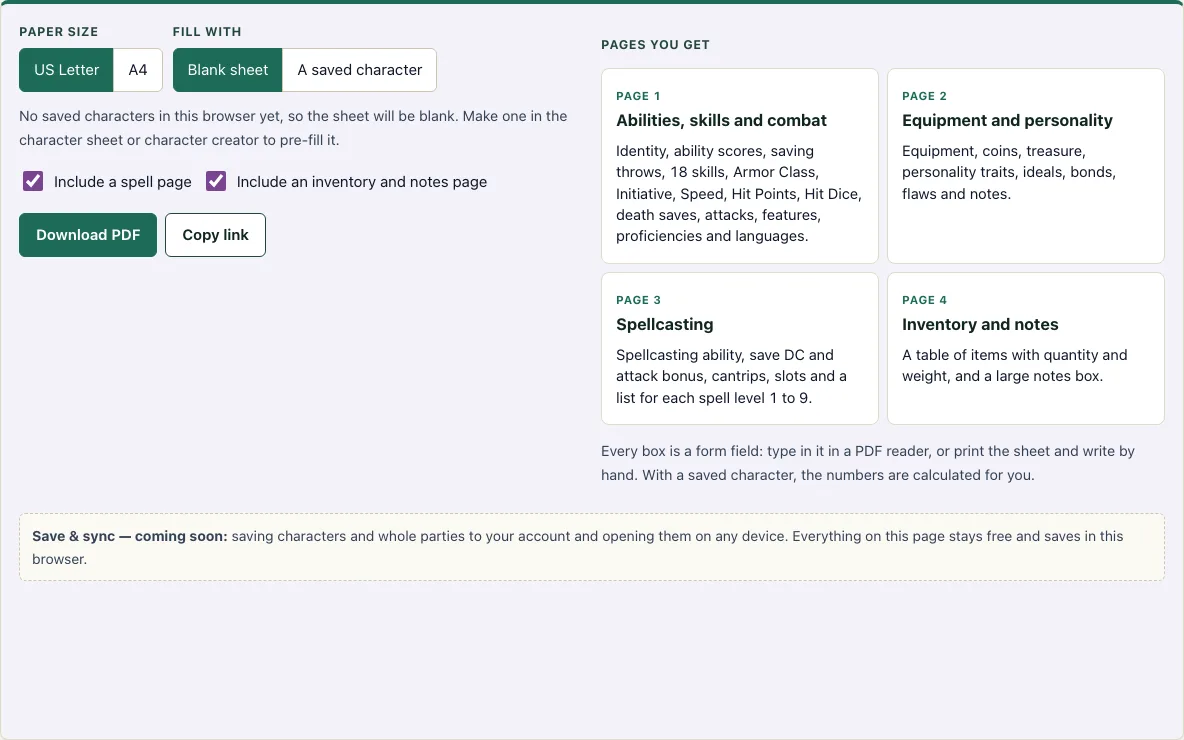
The PDF is two pages by default. Page 1 holds your abilities, skills and combat numbers, and page 2 holds equipment, coins and personality. You can add a spellcasting page and an inventory and notes page, which brings the total to four. It works as a printable dnd character sheet for a table that prefers paper, and as a fillable one for a table that plays on a laptop or tablet.
How to use the character sheet PDF
- Choose a Paper size: US Letter or A4.
- Under Fill with, choose Blank sheet, or A saved character if you have one saved in this browser. When you choose a saved character, a Character from this browser list appears so you can pick which one.
- Tick Include a spell page if your character casts spells.
- Tick Include an inventory and notes page if you want room for items and longer notes.
- Check Pages you get on the right to see which pages the PDF will include. Each page shows what is on it.
- Click Download PDF. The page tells you when the file has downloaded.
- Open the file in any PDF reader and click into the boxes to type, or tick the check boxes.
- To use it on paper, print the PDF, or print it blank and write by hand.
Every box on the sheet is a form field, so you can edit it in most PDF readers. If you started from a saved character, the modifiers, saving throws, skills, Armor Class and spell save DC are already filled in. Copy link keeps your paper size and page choices in the web address. The online character sheet also has a Print button if you prefer to print from the browser.
Is the PDF fillable?
Yes. Every box on the sheet is an AcroForm field, which is the standard form format for PDFs. You can click into a box and type in any PDF reader, tick check boxes such as skill proficiency and expertise, or print the sheet and fill it in by hand.
Most of the numbers on a 5e sheet follow a few simple rules. An ability modifier is your ability score minus 10, divided by 2, rounded down. A saving throw or skill adds your proficiency bonus if you are proficient, and twice that bonus if you have expertise. Your proficiency bonus is +2 at levels 1 to 4 and rises as you level up. Passive Perception is 10 plus your Wisdom (Perception) bonus, and it includes your proficiency bonus if you are proficient in Perception.
For spellcasting, the spell save DC is 8 plus your proficiency bonus plus your spellcasting modifier. The spell attack bonus is your proficiency bonus plus your spellcasting modifier. The rules numbers come from SRD 5.2.1, which is licensed under CC-BY-4.0.
Official 5e character sheet PDF vs this one
Wizards of the Coast publishes its own character sheet PDF on its website. This page makes a separate sheet: you can fill it in online, pre-fill it from a character saved in your browser, and download it for Letter or A4 paper. It does not copy the official sheet.
What is on each page of the printable 5e character sheet?
Page 1 has the identity boxes, the six ability scores with modifiers, saving throws, all 18 skills with a proficiency box and an expertise box, Armor Class, Initiative, Speed, proficiency bonus, Passive Perception, Hit Points, Hit Dice, death saves, an attacks table, features, proficiencies and languages. Page 2 has equipment, coins, treasure, personality traits, ideals, bonds, flaws and notes.
The spell page has the spellcasting ability, spell save DC, spell attack bonus, a cantrips box, slots total and expended for levels 1 to 9, a list box for each spell level and a box for prepared spells. The inventory page is a table of items with quantity and weight, followed by a large notes box.
Can I print the character sheet?
Yes. The PDF prints on US Letter or A4 paper at normal size. In your print dialog, choose actual size or 100% so the layout stays as designed and the boxes line up with the page.
If you print at a different scale, the sheet may shrink or shift and the text may not fit inside the boxes. Printing each page separately works well if you want to keep a copy of the first page at the table and fill the rest later.
Frequently asked questions
Is this character sheet PDF free?
Yes. The tool is free to use, and you do not need to create an account to download the PDF.
Where are my saved characters stored?
A character saved with the character sheet or character creator is kept in the browser you saved it in. Use the same browser to load it again.
Why are some numbers already filled in?
When you start from a saved character, the modifiers, saving throws, skills, Armor Class and spell save DC are calculated for you. You can still edit any text field in your PDF reader.
Can I use A4 paper instead of US Letter?
Yes. Choose A4 before you download the PDF. The sheet prints on A4 at normal size.
Which rules does the sheet use?
The rules numbers come from SRD 5.2.1, which is licensed under CC-BY-4.0. The sheet covers the standard 5e fields, but it does not replace your rulebook for unusual rules or homebrew options.
Can I fill the PDF on my phone or tablet?
Most phone and tablet PDF readers can fill form fields, though some basic viewers cannot. If yours cannot, use the online character sheet instead and print or export from there.
Does the PDF include the modifiers for me?
With a saved character, yes. With a blank sheet, the number boxes are empty and you type in the modifiers yourself.
Can I use the character sheet PDF commercially?
Yes. The PDF you download is yours to use for any purpose, including commercial use, for example as a handout in a paid adventure or a printable you sell. See the terms.
Related tools
- Character sheet: Use it to fill in your character online before you decide whether you want a printed PDF.
- Character creator: Use it to build a character step by step, then carry the result onto your sheet.
- Point buy calculator: Use it to spend your ability score points before you write the scores on your sheet.
- HP calculator: Use it to work out your hit points at each level.
- Spell list: Use it to look up spells before you add them to your spell page.
- Stat roller: Use it to roll ability scores if your group uses dice instead of point buy.
- Class quiz: Use it if you are not sure which class to play before you fill in your sheet.