
DnD Character Creator
Choose a class, species, background and ability scores step by step to get a complete level 1 character you can print or open in the sheet.
Recent
Your last 10 settings, saved only in this browser. Nothing is uploaded.
This free dnd character creator builds a level 1 fifth edition (5e) character using the SRD 5.2.1 rules, one step at a time. It runs in your browser, needs no account, and uploads nothing.
You move through eight steps: Class, Species, Background, Ability scores, Background increase, Class skills, Languages, and Alignment and name. A summary card beside the steps shows your choices as you make them, so you can see the character take shape before you finish. Ability scores can come from the standard array, point buy or 4d6 rolls, and the summary shows hit points, Armor Class, saving throws, skills and languages as numbers. When you are done, you can open the character on the character sheet page, print it, or copy a link that keeps your choices.
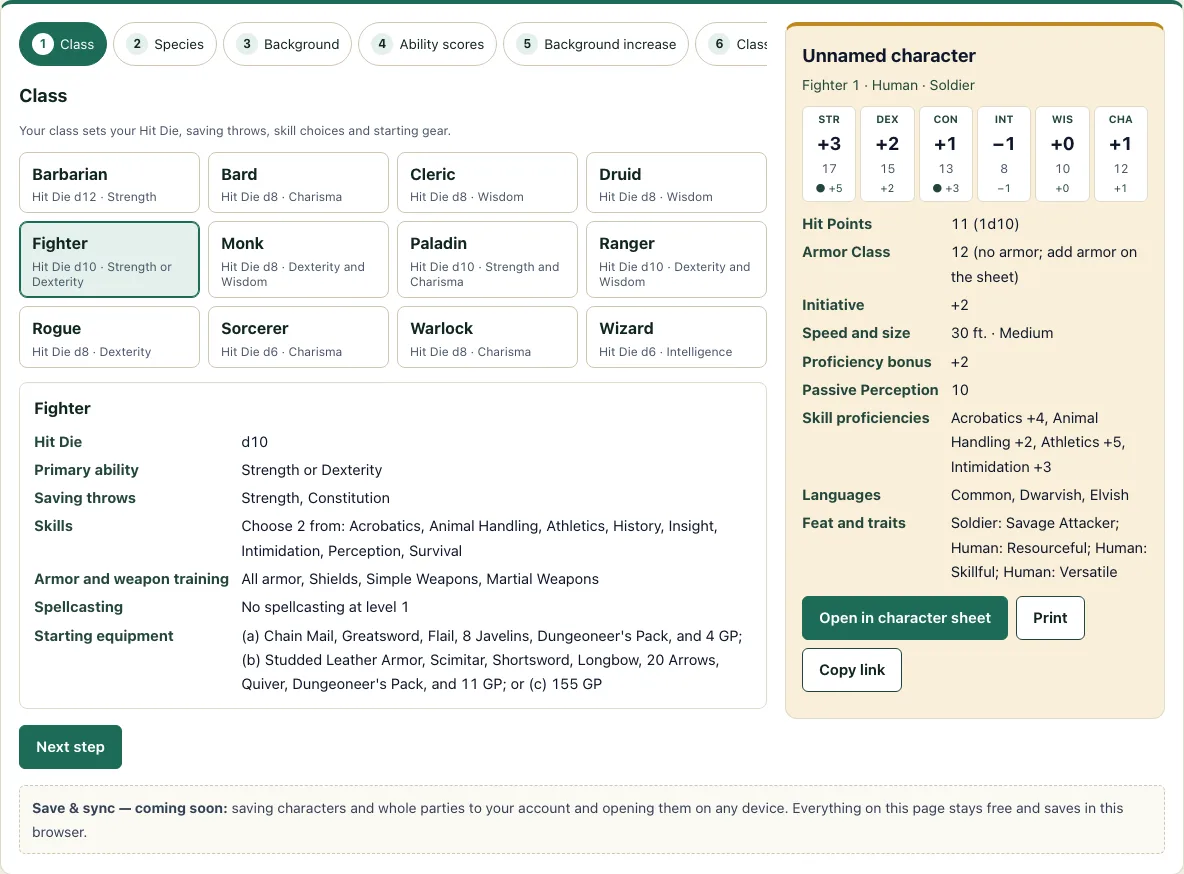
How to use the character creator
- On the Class step, pick one of the 12 SRD classes. Each class shows its Hit Die, primary ability, saving throws, skill count, armor and weapon training, spellcasting and starting equipment.
- On the Species step, pick one of the 9 SRD species. If the species has lineages, choose one, such as Drow, High Elf or Wood Elf for Elf. Tieflings can choose Small or Medium.
- On the Background step, pick Acolyte, Criminal, Sage or Soldier. Each one lists its three ability scores, feat, skills, tool proficiency and equipment.
- On the Ability scores step, choose Standard array, Point buy or Roll 4d6 (four dice, drop the lowest, for each score).
- On the Background increase step, add +2 to one of your background’s abilities and +1 to another, or +1 to all three.
- On the Class skills step, choose the number of skills your class allows. Skills your background already gives you cannot be picked again.
- On the Languages step, keep Common and choose two more languages, or roll on the d12 table.
- On the Alignment and name step, pick an alignment if you want one, then type a name. The name box is free text.
Use the Back and Next buttons to move between steps. When the character is complete, choose Open in character sheet to send it to the character sheet page. Print prints the character, and Copy link saves your choices in the web address, so you can return to the same character later.
How do I make a 5e character?
A 5e character starts with six ability scores: Strength, Dexterity, Constitution, Intelligence, Wisdom and Charisma. Each score produces a modifier, which you find by subtracting 10, dividing by two and rounding down. A score of 17 gives +3, and a score of 8 gives -1. If you pick a spellcasting class, the 5e spell slots tool shows how many slots it gets as it levels.
Your proficiency bonus at level 1 is +2. You add it to any saving throw or skill you are proficient in. Level 1 hit points equal the Hit Die maximum plus your Constitution modifier. Without armor, Armor Class is 10 plus your Dexterity modifier.
Take a Fighter using the SRD fighter standard array (15, 14, 13, 8, 10, 12 for Str, Dex, Con, Int, Wis, Cha) with the Soldier background. After the +2 to Strength and +1 to Constitution, the character has Str 17, Dex 14 and Con 14. The Fighter’s d10 gives 10 + 2 = 12 hit points, Armor Class is 12 without armor, and the Strength saving throw is +5 (+3 modifier, +2 proficiency).
What is the standard array?
The standard array is a fixed set of six scores: 15, 14, 13, 12, 10 and 8. You assign each number to one ability, using each number once, so you never need dice to get a balanced set. The tool suggests an order for each class based on the SRD, and you can change any assignment.
The other two options on the step are Point buy and Roll 4d6. Rolling 4d6 and dropping the lowest die gives each of six scores. The Seed box sets the roll, and the same seed always produces the same scores, so you can repeat a roll.
How does point buy work?
Point buy starts every score at 8 and gives you 27 points to spend. Each score can go up to 15 before background increases are added. The cost rises faster at the top: 8 costs 0, 9 costs 1, 10 costs 2, 11 costs 3, 12 costs 4, 13 costs 5, 14 costs 7 and 15 costs 9.
The standard array values fit exactly into 27 points. Spending 9 on 15, 7 on 14, 5 on 13, 4 on 12, 2 on 10 and 0 on 8 totals 27. Point buy lets you trade a lower score for a higher one, so you can shape the character more precisely than the fixed array allows.
How are ability scores increased by background?
Each background lists three ability scores. On the Background increase step, you add +2 to one of them and +1 to another, or +1 to all three. No score can go above 20 after these increases.
The increases are applied after you choose your scores, so they stack on top of the array, point buy or roll. In the worked example above, the Soldier’s +2 went to Strength and +1 went to Constitution.
Frequently asked questions
Is this D&D character creator free?
Yes, it is free to use. You do not need an account, and nothing you enter is uploaded.
Which rules does the creator use?
It uses the SRD 5.2.1. The classes, species, backgrounds and languages come from the SRD tables.
How many species and backgrounds can I choose from?
You can choose from 9 species: Dragonborn, Dwarf, Elf, Gnome, Goliath, Halfling, Human, Orc and Tiefling. The backgrounds are Acolyte, Criminal, Sage and Soldier.
Does the tool create characters above level 1?
No. It builds a level 1 character, so the hit points and proficiency bonus use level 1 values.
Can the tool generate a name for my character?
The name box is free text, so type whatever you like. For ideas, the DnD name generator makes names for every species the creator offers.
How do I save my character?
Use Copy link to store your choices in the web address. Open the link later to return to the same character, or choose Open in character sheet to continue on the character sheet page.
Can I roll the same ability scores again?
Yes, if you use the same seed. The Roll 4d6 option gives the same six scores for the same seed every time.
Can I use a character made here commercially?
Yes. A character you build here is yours, and you may use it commercially, for example in a published adventure, a paid campaign guide or a printable you sell. See the terms.
Related tools
- Character sheet: Use this to record and track your character’s stats during play.
- Character sheet PDF: Choose this when you want a printable sheet to fill in by hand.
- Point buy calculator: Use this to test different point buy spreads before you commit to one.
- Stat roller: Use this to roll ability scores without building a full character.
- Class quiz: Take this if you are not sure which class suits you.
- Alignment test: Use this to explore which alignment fits your character’s outlook.
- Languages: Look here for the full list of SRD languages before you choose.
- HP calculator: Use this to check hit points at levels beyond 1.
- XP chart: Use this to see how much experience each level requires.